Android app security best practices for Australian founders step-by-step guide 2026 | Updated November 2026 | Appomate Editorial Team | 3-5 hours to implement core controls, ongoing review each release cycle | Beginner
What You’ll Learn
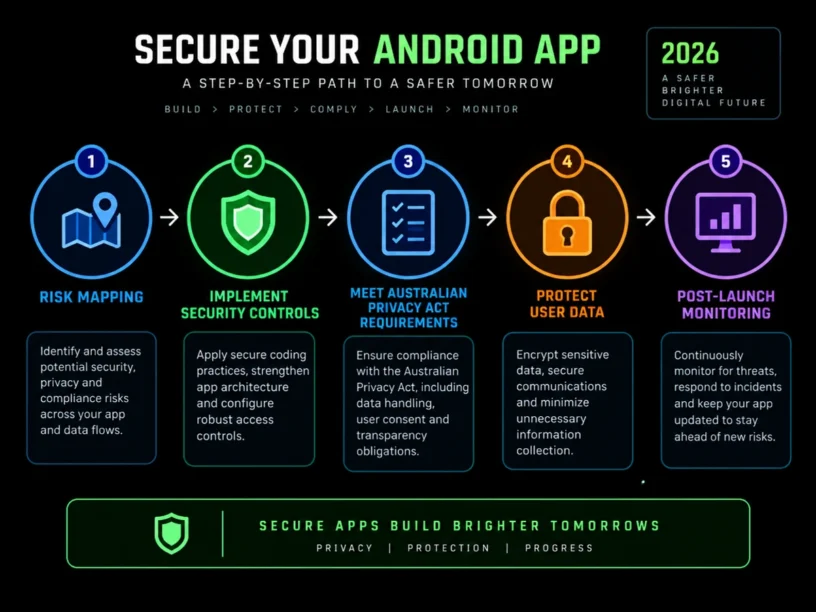
This guide walks you through Android app security best practices for Australian founders in 2026, one practical control at a time. By the end, you will know how to:
- Map your risk surface against the OWASP Mobile Top 10, the industry-standard checklist for mobile security risks.
- Lock down stored data with Android Keystore, the platform’s hardware-backed system for cryptographic keys and credentials.
- Secure your network and APIs so all communication is encrypted and authenticated.
- Meet Australian privacy and Google Play compliance requirements, including the Notifiable Data Breaches scheme and the Data Safety section.
- Test your app before and after launch so your security posture stays verified.
You don’t need a security engineering background. You need a clear checklist and, ideally, a development partner who already builds this way. Follow the steps below and you’ll have a defensible, auditable security posture that investors, enterprise customers, and Australian regulators can all respect.
Prerequisites: a working Android app or prototype (or one in active development), a Google Play Console account, and a basic sense of what personal data your app collects. For related guidance, see How To Secure A Mobile App Before Launch In Australia 2026 Step By Step Guide.
Why Android App Security Matters in 2026
Android is not a niche platform that Australian founders can afford to deprioritise. It still runs the majority of the world’s smartphones, and in Australia it holds a substantial share of the device market. One 2026 industry analysis puts Android smartphone sales at 54.5% locally, against 44.3% for iPhone. Hardening only your iOS app leaves a large share of potential users under-protected.
The regulatory and threat environment has also tightened. The Office of the Australian Information Commissioner recorded 1,205 data breach notifications in calendar year 2025, the highest annual total since mandatory reporting began in 2018 and an 8% increase on 2024. Malicious or criminal attacks caused 716 of those notifications. Google has also raised the bar. By February 2026, the Play Store’s Data Safety section became mandatory for all apps, and new apps and updates must target Android 16 from August 31, 2026 or risk losing visibility with new users.
For a non-technical founder, this means security can no longer be bolted on just before a Series A raise or a major enterprise sales call. It has to be designed in from the first sprint. That’s why Appomate builds security controls into every Android build from day one.
Key Takeaway: Rules like the mandatory Data Safety section and rising breach notifications mean security must be a core design principle from the start. For supporting data, see Build a Secure App in Australia | Best Practices. For related guidance, see Protect Your Startup Best Practices For Mobile App Security Against Cyber Attacks.
The Process at a Glance
| Step | Action | Time | Outcome |
|---|---|---|---|
| 1 | Map risks using OWASP Mobile Top 10 | 45-60 minutes | Prioritised list of your app’s specific threats |
| 2 | Secure storage with Android Keystore | 1-2 hours (dev time) | No hardcoded secrets or plaintext data at rest |
| 3 | Lock down network and API communication | 1-2 hours (dev time) | TLS-only traffic with verified, pinned endpoints |
| 4 | Meet Privacy Act and Play Store compliance | 1-3 hours | Accurate Data Safety form and privacy policy |
| 5 | Test, harden, and monitor continuously | Ongoing, 2-4 hours per release | Verified security posture before every release |
Total time to set the baseline: roughly one working day for initial setup, then 2-4 hours per release cycle.
Step 1: Map Your App’s Risks Using the OWASP Mobile Top 10
What You’re Doing
Before writing any security control, your team needs agreement on what “secure” means for your app. The OWASP Mobile Top 10 is the most widely adopted standard for mobile security risks, and any serious auditor or investor due diligence process will reference it.
How to Do It
- Pull up the current OWASP Mobile Top 10 list. It covers Improper Credential Usage, Inadequate Supply Chain Security, Insecure Authentication/Authorization, Insufficient Input/Output Validation, Insecure Communication, Inadequate Privacy Controls, Insufficient Binary Protections, Security Misconfiguration, Insecure Data Storage, and Insufficient Cryptography.
- For each item, ask a plain-English question. Does my app store passwords locally? Does it talk to a backend over plain HTTP anywhere? Does it rely on third-party SDKs I haven’t checked?
- Rank the risks by likelihood for your app. A fintech app should weigh authentication heavily; a marketplace should weigh supply chain and payments.
- Write the ranked list down. It becomes your working security brief for the next four steps.
Common Mistakes
Founders often reduce security to “did we add a login screen?” The real risk usually sits further down the stack. The OWASP Mobile Top 10 now ranks Inadequate Supply Chain Security as the #2 vulnerability, reflecting how aggressively attackers target third-party libraries.
What Done Looks Like
A one-page, ranked list of the five or six risks most relevant to your Android app, written in language your whole team understands.
Step 2: Secure Stored Data and Credentials With Android Keystore
What You’re Doing
Insecure storage and hardcoded credentials are among the most common Android vulnerabilities, and among the most preventable. This step ensures no sensitive data or hardcoded credential sits in plaintext on the device or inside your app’s binary.
How to Do It
- Audit your codebase for hardcoded API keys, passwords, or tokens. Never hardcode API keys, passwords, or authentication tokens. Fetch them securely at runtime instead.
- Move all credential and secret storage into the Android Keystore system. It exists for exactly this job.
- Use OAuth 2.0, an open standard for access delegation, or OpenID Connect, an authentication layer built on it. Pair them with short-lived access tokens and refresh token rotation, rather than storing passwords long term.
- Add biometric authentication through BiometricPrompt, Android’s class for displaying a biometric dialog. Treat it as a convenience layer on top of hardware-backed Keystore keys, never as the only identity factor. Biometrics work best combined with a fallback PIN or passcode and hardware-backed keys.
Example
| Data type | Wrong approach | Secure approach |
|---|---|---|
| API key | Hardcoded string in source code | Fetched server-side, never shipped in the APK |
| Auth token | Stored in SharedPreferences as plain text | Stored via Android Keystore-backed encryption |
| User password | Cached locally for “remember me” | Never stored; short-lived token issued instead |
What Done Looks Like
Nothing sensitive exists as plaintext in your code, logs, or local storage. Every secret is either held server-side or protected by Keystore.
Step 3: Lock Down Network Communication and API Security
What You’re Doing
Strong storage doesn’t help if data is exposed in transit. This step ensures everything moving between your app and servers is encrypted and authenticated.
How to Do It
- Enforce TLS (Transport Layer Security) on every network call, with no cleartext exceptions in your Android network security config. Always use HTTPS.
- Watch for development shortcuts that slip into production, such as AllowAllHostnameVerifier or ignoring SSL errors in checkServerTrusted. We’ve seen these survive right up to release, so search your code for them explicitly.
- Add certificate pinning so your app trusts only your own servers, not every certificate authority installed on the device.
- Secure your APIs with OAuth2 and PKCE (Proof Key for Code Exchange) for mobile authentication flows. Validate all inputs on the server, because client-side checks can always be bypassed.
- Vet every third-party SDK your app bundles. Every dependency should be verified, monitored, and updated to reduce supply chain risk.
Best Practices
- Run a Software Composition Analysis (SCA) scan on your dependency tree before every major release. SCA identifies the open source and third-party components in your codebase.
- Treat any SDK that requests more permissions than it needs as a red flag. Apply the principle of least privilege, granting only the minimum permissions required.
What Done Looks Like
Every network call uses TLS without exceptions, your app rejects tampered or self-signed certificates, and your dependency list is documented and current.
Key Takeaway: Encrypt all traffic with TLS, pin certificates, secure APIs with OAuth2 and PKCE, and vet every third-party SDK. For related guidance, see Ios App Security Best Practices For 2026 That Every App Owner Should Know.
Ready to build your app?
Book a free Visioning Call with our team today and walk away with a clear roadmap, expert feedback, and a plan to bring your idea to life. No technical knowledge required.
Step 4: Meet Australian Privacy Act and Google Play Compliance Requirements
What You’re Doing
Technical controls are only half the job. Australian regulators and Google each have expectations about how you handle personal data. Good code alone won’t satisfy either.
How to Do It
- Confirm whether your business is an APP entity, meaning an organisation bound by the Australian Privacy Principles (APPs) under the Privacy Act 1988. If it is, you are subject to the Notifiable Data Breaches scheme, which requires notifying affected individuals and the Commissioner when a breach is likely to cause serious harm. You have a 30 day assessment window to determine whether notification is required.
- Write or update a public, accessible privacy policy. Google requires one before you can complete the Data Safety form.
- Complete the Data Safety section in Google Play Console accurately. Declare every data type your app and its SDKs collect, whether it’s shared with third parties, and whether it’s encrypted in transit and at rest.
- Draft a simple internal data breach response plan now, mapped against the 30-day assessment window.
Common Mistakes
Plenty of founders fill in the Data Safety form once at launch and never revisit it. Apps with inaccurate declarations face blocked updates or removal from the store. The declaration must also match your privacy policy on every update.
What Done Looks Like
A current, accurate Data Safety declaration in Play Console, a published privacy policy that matches it, and a written breach response plan stored where your team can find it.
Key Takeaway: Compliance means a public privacy policy and an accurate, regularly updated Data Safety declaration, plus a ready response plan under the Notifiable Data Breaches scheme.
Step 5: Test, Harden, and Monitor Before and After Launch
What You’re Doing
Security isn’t finished once. This step builds testing, hardening, and monitoring into every release so vulnerabilities are caught before they reach users or a regulator. Think of it as a cycle you repeat every time you ship.
How to Do It
- Run static (SAST) and dynamic (DAST) analysis against each build. SAST (Static Application Security Testing) analyses source code without running it. DAST (Dynamic Application Security Testing) analyses the app while it runs. Using a SAST scanner to catch misconfigurations early costs far less than fixing them after launch.
- Adopt the Play Integrity API, a Google Play API that helps protect apps and games from risky interactions and fraud, if your app handles payments, accounts, or anything else prone to abuse. Google is steering developers away from the deprecated SafetyNet Attestation toward Play Integrity.
- Implement integrity checks that detect tampering. Obfuscate sensitive code that must stay in the binary. It won’t stop a determined attacker, but it raises the cost significantly.
- Target the required API level (Android 16 from August 2026) for every update. Outdated targeting is one of the most common reasons Play submissions get flagged.
- Re-run your full checklist before every release, not just the first one. Appomate folds security testing into its agile delivery cycle, so it never becomes a bolt-on audit at the end.
What Done Looks Like
Every release passes a documented security checklist before it reaches Google Play. You can show investors or enterprise customers a dated record of when each control was last verified.
Key Takeaway: Build SAST/DAST, the Play Integrity API, and regular checklist reviews into every release cycle so you catch problems before your users do.
What to Do After Completing the Process
Phase 1 (first 30 days): Run the full five-step checklist end to end. Fix gaps in Steps 2 and 3 first, since they carry the highest breach risk. Then publish your updated privacy policy and Data Safety declaration.
Phase 2 (next quarter): Build security testing into your release cadence. Schedule a recurring dependency and SDK audit, and run a tabletop exercise of your breach response plan.
Phase 3 (ongoing): Treat security as a differentiator in enterprise and investor conversations. Appomate’s Further Faster Framework is designed to take founders from idea to market in as little as 6 weeks, so security doesn’t have to slow that down.
Resources You’ll Need
| Resource | Role | Required/Recommended/Optional | Price |
|---|---|---|---|
| Appomate | Full-service Android development partner that builds security controls in from the first sprint | Recommended | Project-based, startup-friendly pricing |
| OWASP Mobile Top 10 | Industry-standard risk checklist for mobile apps | Required | Free |
| Android Keystore documentation | Official guide for secure credential and key storage | Required | Free |
| Google Play Console Data Safety | Mandatory data collection disclosure for Play Store listing | Required | Free (Play Console developer fee applies) |
| OAIC Notifiable Data Breaches guidance | Official Australian breach assessment and notification rules | Required | Free |
| Play Integrity API | Device and app integrity verification for abuse-prone apps | Recommended | Free |
Common Plateaus & How to Break Through
Problem: “We added a privacy policy, so we’re compliant”
Likely cause: The policy was written once and never checked against your actual Data Safety declaration or current SDK behaviour.
Fix: Cross-check your privacy policy line by line against your Play Console Data Safety form every release. Mismatches put you at risk of removal.
Problem: Security testing keeps getting pushed to “after launch”
Likely cause: Founders treat security as a separate project instead of part of the sprint.
Fix: Add a lightweight SAST scan and an OWASP checklist review to your definition of “done” for every release.
Problem: A third-party SDK causes a Data Safety mismatch
Likely cause: Founders audit their own code and forget that the declaration must cover data collected by bundled third-party libraries and SDKs.
Fix: Keep a living inventory of every SDK in your app, check each one’s published data practices, and re-verify after every upgrade.
Problem: You don’t know if you could meet the 30-day breach assessment window
Likely cause: No documented incident response process exists, so a real incident exposes the gaps under pressure.
Fix: Draft a one-page breach response plan now and run a tabletop exercise against the 30-day window. Test it while nothing is on fire.
Conclusion
Following Android app security best practices for Australian founders in 2026 doesn’t require becoming a security expert overnight. It comes down to five repeatable steps: map your risks, secure stored data, lock down your network, meet Australian compliance requirements, and test continuously every time you ship.
Key Takeaways
- A founder who completes all five steps has a defensible, documented security posture that satisfies Google Play, Australian privacy regulators, and enterprise due diligence.
- The biggest wins come from basics: no hardcoded secrets, TLS everywhere, and an accurate Data Safety declaration. You don’t need exotic tooling.
- Your next move: run the Step 1 risk-mapping exercise this week, even informally, and keep that list as the starting checklist for every release.
FAQ
How do I follow Android app security best practices for Australian founders in 2026?
Start by mapping your app’s risks against the OWASP Mobile Top 10. Store secrets and credentials in Android Keystore, and lock down all network and API traffic with TLS (Transport Layer Security) and certificate pinning. Complete Google Play’s Data Safety declaration alongside your obligations under the Australian Privacy Act and the Notifiable Data Breaches scheme. Finally, test every release with static analysis and the Play Integrity API. The baseline takes roughly a day to set up, then 2-4 hours of review per release.
Is Android or iOS more important to secure for an Australian startup?
Both matter, but Android shouldn’t be deprioritised. One 2026 analysis puts Android device sales in Australia at 54.5% against 44.3% for iPhone. Skipping Android security leaves a large share of your local market exposed.
What is the OWASP Mobile Top 10 and why does it matter for Android apps?
The OWASP Mobile Top 10 is the most widely adopted catalogue of mobile security risks, covering everything from improper credential usage to insecure data storage. Every production app should address it before launch, and it gives developers and security professionals a shared language.
Do Australian startups legally have to report a data breach?
If your business is an APP entity under the Privacy Act 1988, yes. You must assess a suspected breach and, if it is likely to cause serious harm, notify the OAIC (Office of the Australian Information Commissioner) and affected individuals within 30 days, under the Notifiable Data Breaches scheme.
What is Google Play’s Data Safety section and is it mandatory?
The Data Safety section is a structured disclosure in Play Console that explains what data your app and bundled SDKs collect, whether they share it, and how it’s protected. As of February 2026, it is mandatory for all apps on the Google Play Store. Inaccurate declarations can lead to blocked updates or removal.
How much does it cost to make an Android app secure?
Most core controls, including TLS, Android Keystore, OAuth2, and an accurate Data Safety declaration, cost nothing beyond development time, because they rely on free, built-in Android and Google Play tools. Working with an experienced partner like Appomate is often more cost-effective than hiring in-house security specialists too early.
What is Android Keystore and why should my app use it?
Android Keystore is the platform’s hardware-backed system for storing cryptographic keys and credentials. Use Android Keystore for credential storage rather than SharedPreferences or hardcoded values, since those are easy to extract through reverse engineering.
How often should I re-test my Android app’s security?
Make it part of every release cycle, not a one-time event. Re-run static analysis, re-verify your Data Safety declaration, and re-audit third-party SDKs each time you ship an update.
Methodology: This guide synthesises Google Play developer documentation, the OWASP Mobile Top 10, Australian OAIC Notifiable Data Breaches statistics, and industry mobile security research current as of November 2026. Figures and regulatory requirements change, so confirm current Google Play policy and Privacy Act obligations directly with Google and the OAIC before relying on this guide for compliance decisions.