What You’ll Learn
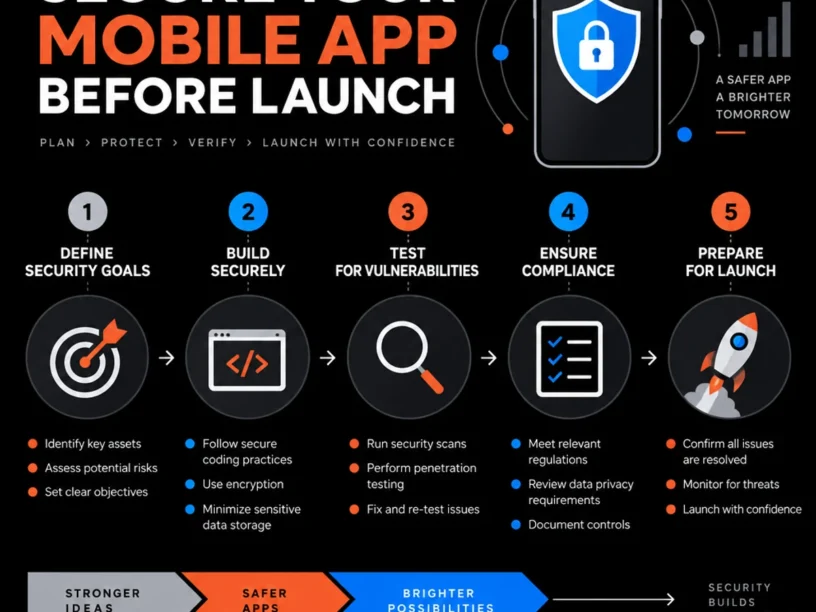
how to secure a mobile app before launch in Australia | This guide walks you through how to secure a mobile app before launch in Australia in 2026. By following these five practical phases, you will:
- Map your Australian Privacy Act and Notifiable Data Breaches (NDB) obligations to define clear compliance scope.
- Close technical vulnerabilities using the OWASP Mobile Top 10 framework.
- Complete Apple App Store and Google Play privacy disclosures correctly to ensure first-submission approval.
- Run a pre-launch security test to independently verify your app’s defenses.
- Build a 72-hour-ready breach response plan before launch day.
- Understand exactly which Australian Privacy Principles (APPs) apply to your app.
Why Securing a Mobile App Before Launch Matters in Australia in 2026
The Office of the Australian Information Commissioner (OAIC) received 1,205 data breach notifications in 2025, an 8% jump from 2024’s 1,112. Malicious or criminal attack accounted for 716 of those notifications (59%), while health service providers reported 225 breaches, the hardest-hit sector.
Under proposed Tranche 2 reforms, the NDB scheme would require notification to OAIC within 72 hours. “Precise geolocation tracking data” would become sensitive information where movements are tracked over time within a 500-metre radius, meaning location-based apps face additional compliance obligations.
App stores have tightened gates significantly. On Google Play alone, over 255,000 apps have been prevented from gaining excessive access to sensitive data, and more than 80,000 developer accounts have been banned for policy violations. A secure launch is now the difference between smooth rollout and rejection or compliance costs. For supporting data, see Australia Free Trade Agreement.
The Process at a Glance
| Step | Action | Time | Outcome |
|---|---|---|---|
| 1 | Map Privacy Act and NDB obligations | 2-4 hours | Clear compliance scope defined |
| 2 | Harden app against OWASP Mobile Top 10 | 1-3 weeks | Core vulnerabilities closed |
| 3 | Complete Apple and Google privacy disclosures | 3-6 hours | Store-ready privacy metadata |
| 4 | Run a pre-launch penetration test | 1-2 weeks | Verified security report in hand |
| 5 | Build a notifiable breach response plan | 2-4 hours | 72-hour-ready incident process |
Total hands-on time: roughly 3 to 6 weeks from first compliance review to a security-tested, store-submitted build, depending on app complexity.
Step 1: How to Map Your Australian Privacy Act Obligations Before You Build
What You’re Doing
You’re identifying exactly which Australian Privacy Principles (APPs) and NDB scheme requirements apply to your app. Every security decision should be grounded in actual legal obligation.
How to Do It
- List every data type your app collects: names, emails, location, health data, payment details, device IDs.
- Check if you’re an “APP entity” under the Privacy Act 1988. An APP entity is typically an organization with turnover over AUD 3 million, or any business handling health information.
- Flag sensitive categories early. Precise geolocation tracking data is proposed to become sensitive information where movement is tracked within a 500-metre radius over time, so location-based apps need consent flows built in from day one.
- Note the automated decision-making transparency deadline: on 10 December 2026, automated decision-making transparency obligations take effect. If your app uses algorithms to make decisions affecting users, this matters.
- Draft or update your privacy policy to match this list exactly.
Best Practices
- Treat the privacy policy as a living document tied to your actual data flows.
- Get a lawyer or development partner like Appomate to sanity-check scope before you build.
What Done Looks Like
You have a written, app-specific data inventory and privacy policy draft that matches exactly what your build collects. For a more detailed walkthrough, see How to Comply with the Australian Privacy Act.
Ready to build your app?
Book a free Visioning Call with our team today and walk away with a clear roadmap, expert feedback, and a plan to bring your idea to life. No technical knowledge required.
Step 2: How to Harden Your App Against the OWASP Mobile Top 10
What You’re Doing
You’re closing the specific technical vulnerabilities that cause the majority of real-world mobile app breaches using the industry-standard risk framework.
How to Do It
- Work through the OWASP Mobile Top 10 (2024 release) line by line: M1: Improper Credential Usage, M2: Inadequate Supply Chain Security, M3: Insecure Authentication/Authorization, M4: Insufficient Input/Output Validation, M5: Insecure Communication, M6: Inadequate Privacy Controls, M7: Insufficient Binary Protections, M8: Security Misconfiguration, M9: Insecure Data Storage, M10: Insufficient Cryptography.
- Remove any hardcoded API keys, tokens, or passwords from your codebase.
- Audit every third-party SDK for what data it collects and whether it’s actively maintained.
- Force HTTPS/TLS on every network call and enable certificate pinning where feasible.
- Encrypt sensitive data at rest using platform-native secure storage: Keychain on iOS, Keystore on Android.
Example
| Risk | Common real-world cause | Fix |
|---|---|---|
| Improper Credential Usage | API key committed to source code | Move secrets to server-side config or a secrets manager |
| Insecure Data Storage | User tokens saved in plain SharedPreferences/UserDefaults | Use Keychain/Keystore encrypted storage |
| Insecure Communication | No certificate pinning on payment API calls | Enforce TLS 1.2+ and pin certificates |
What Done Looks Like
Every item on the OWASP Mobile Top 10 checklist has either been remediated or documented as not applicable, with evidence attached.
Step 3: How to Pass Apple App Store and Google Play Privacy Reviews
What You’re Doing
You’re completing the exact privacy disclosures both app stores require so your submission isn’t rejected for inaccurate declarations.
How to Do It
- For iOS, prepare a working privacy policy URL, a populated App Privacy card in App Store Connect, a privacy manifest declaring every third-party SDK, an App Tracking Transparency prompt if you use IDFA, and an AI consent screen if you share personal data with external models.
- For Android, complete the Google Play Data Safety form in Play Console, declaring every data type collected, whether it’s shared, and your encryption practices.
- Confirm your privacy policy is live over HTTPS, not a PDF or editable document. Both stores reject insecure or non-static links.
- Cross-check that your store disclosures and your actual privacy policy describe identical data practices.
Common Mistakes
Every app needs a privacy policy on both platforms, including apps that collect no data. Forgetting that SDKs like ad networks count as data sharing, even if your own code never touches that data, is another common error.
What Done Looks Like
Your App Store Connect privacy card and Google Play Data Safety form are submitted and consistent with your live privacy policy.
Step 4: How to Pen-Test and Audit Before You Submit
What You’re Doing
You’re independently verifying that fixes actually work under adversarial testing, before real users or attackers find the gaps.
How to Do It
- Choose a test method proportional to your risk. Simple apps can use automated static/dynamic analysis tools, while apps handling payments or health data need a manual penetration test against the OWASP Mobile Application Security Testing Guide (MASTG).
- Test authentication flows specifically: session handling, token expiry, and multi-factor options.
- Attempt to intercept network traffic to confirm TLS and certificate pinning hold.
- Document every finding with severity and remediation status. This becomes your audit trail if regulators ask.
- Re-test fixed issues before final sign-off.
Best Practices
- Budget security testing as a fixed phase in your launch timeline rather than squeezing it in last.
- Ask whether security testing is built into your development partner’s process rather than sold as a bolt-on.
What Done Looks Like
You hold a written security test report with no unresolved critical or high-severity findings, dated before your submission date. For related guidance, see Protect Your Startup Best Practices For Mobile App Security Against Cyber Attacks.
Step 5: How to Build a Notifiable Data Breach Response Plan
What You’re Doing
You’re pre-writing the process your team will follow if a breach happens, so you can act within the tightening Australian notification window.
How to Do It
- Assign a named owner for breach response.
- Write the detection-to-notification workflow: how you’ll discover a breach, assess if it’s eligible under the NDB scheme, and notify OAIC and affected users.
- Build your timeline around the tightening standard. The NDB scheme is proposed to require notification to OAIC within 72 hours, so your internal escalation steps need to be fast.
- Keep a pre-drafted user notification template ready, adjusted later for specifics.
- Review the OAIC’s official NDB guidance annually as reforms reshape obligations through 2026 and 2027.
What Done Looks Like
A one-page incident response plan exists, named owners are assigned, and your team has walked through a tabletop scenario at least once before launch.
What to Do After Securing Your App Pre-Launch
First 30 days post-launch: Monitor crash and error logs closely for anomalies that might indicate exploitation attempts. Watch app store review scores for early user-reported security or privacy complaints.
First quarter: Schedule your next security review. Treat the pre-launch audit as a baseline, not a one-time event, especially as new SDKs or features get added.
Ongoing: Build security and privacy review into every major release cycle. Track upcoming Privacy Act reform milestones so your compliance stays current rather than reactive.
Resources You’ll Need
| Resource | Role | Required/Recommended | Price |
|---|---|---|---|
| Appomate | Full-service app development and security partner | Recommended | Custom quote |
| OWASP MASTG | Technical security testing reference guide | Recommended | Free |
| OAIC NDB Scheme Guidance | Official breach notification rules and templates | Required | Free |
| Google Play Data Safety form | Mandatory Android privacy disclosure tool | Required | Free |
| Apple App Store Review Guidelines | Official iOS submission and privacy rules | Required | Free |
See also, see SIEM for App Security in Australia: Protecting Modern Apps.
Troubleshooting Common Issues
App rejected for privacy policy mismatch
Likely cause: Your App Store or Google Play privacy disclosures describe different data practices than your actual privacy policy or code. Fix: Re-audit every SDK’s data collection, update both the policy and store forms to match exactly, and resubmit.
Security audit keeps finding the same issue after “fixing” it
Likely cause: The fix addressed a symptom rather than the root pattern. Fix: Implement a proper secrets manager or server-side config so the whole class of issue is closed, then re-test.
Unsure if the NDB scheme applies to your app
Likely cause: Confusion over turnover thresholds or data sensitivity rules. Fix: If you handle health information, financial data, or precise location at scale, assume it applies and build the response plan anyway.
Launch timeline slipping because security was left until the end
Likely cause: Security treated as a final checklist item rather than a parallel workstream. Fix: Bring in a partner who builds security into development from day one rather than bolting it on before submission. For more troubleshooting advice, see Australia Introduces Mandatory Security Standards for Smart ….
Conclusion
Securing a mobile app before launch in Australia in 2026 requires five connected phases: understanding your Privacy Act and NDB obligations, closing OWASP Mobile Top 10 vulnerabilities, matching your app store disclosures to reality, independently verifying your fixes, and having a breach response plan ready. Founders who treat this as parallel work rather than a last-minute scramble launch faster and with far less regulatory and reputational risk.
Key Takeaways
- A secure, store-ready, regulator-ready app is achievable in 3 to 6 weeks of focused work.
- The biggest risk isn’t exotic hacking. It’s mismatched privacy disclosures and unpatched OWASP Mobile Top 10 basics.
- Next action: Start with Step 1 today, map your actual data collection before writing another line of code or policy text.
Appomate empowers founders to transform concepts into market-ready apps quickly and safely. Their approach combines Australia-based strategy and design with a world-class global development team to deliver premium quality at startup-friendly pricing, helping founders get further faster from validation to launch, growth and exit.
FAQ
How to secure a mobile app before launch in Australia in 2026?
Follow five key phases: map your Privacy Act and NDB obligations; harden your app against the OWASP Mobile Top 10 risks; complete accurate Apple App Store and Google Play privacy disclosures; run an independent security test such as a penetration test; and build a 72-hour-ready breach response plan. These phases typically take 3 to 6 weeks and cover both technical and legal aspects of launch security in Australia.
Do all mobile apps need a privacy policy in Australia?
Yes. Every app needs a privacy policy on both platforms, including apps that collect no data. If you’re an APP entity under the Privacy Act 1988, you have additional legal obligations beyond the app store requirement.
What is the Notifiable Data Breaches scheme and does it apply to my app?
The Notifiable Data Breaches (NDB) scheme requires certain organizations to notify the OAIC and affected individuals when a data breach is likely to cause serious harm. Under proposed reforms, this notification window would be 72 hours. Apps handling health, financial, or precise location data should assume it applies.
How much does a mobile app security audit cost in Australia?
Costs vary based on app complexity. A simple consumer app might only need automated scanning tools, while a fintech or health app typically needs a manual penetration test against the OWASP MASTG, which costs more but produces a documented report regulators and investors can trust.
What is the OWASP Mobile Top 10 and why does it matter for app security?
The OWASP Mobile Top 10 is the industry-standard list of the ten most common mobile app vulnerabilities, covering issues like Improper Credential Usage, Inadequate Supply Chain Security, Insecure Authentication/Authorization, and Insufficient Cryptography. Working through this list systematically closes the gaps that cause the vast majority of real-world mobile breaches.
How long does it take to secure an app before launch?
Most founders need 3 to 6 weeks of parallel work: a few hours for privacy mapping and breach planning, 1 to 3 weeks for technical remediation against the OWASP Mobile Top 10, and 1 to 2 weeks for independent security testing, depending on app complexity and team size.
What happens if my app collects location data in Australia?
Location data already requires careful handling under the Privacy Act. Under proposed reforms, precise geolocation tracking data would become sensitive information where movement is tracked over time within a 500-metre radius. Build explicit, granular location consent into your app from the start rather than retrofitting it later.
Can Appomate help secure and launch my app?
Appomate is a Melbourne-based app development partner that works across strategy, design, development, launch, and ongoing support. Appomate empowers founders, especially those without a technical background, to transform concepts into market-ready apps quickly and safely, helping you get further faster from idea through to a secure, scalable launch.
Methodology note: This guide was compiled from publicly available OAIC Notifiable Data Breaches statistics, official Privacy Act reform consultation papers, the OWASP Mobile Top 10 (2024 release), and current Apple App Store and Google Play developer policy documentation current as of October 2026. Laws and store policies change; always confirm current requirements with a qualified Australian privacy lawyer and the official app store developer documentation before launch.