how to comply with the Australian Privacy Act for app development in 2026 | Updated October 2026 | Appomate Team | 6-10 weeks to full compliance | Beginner
What You’ll Learn
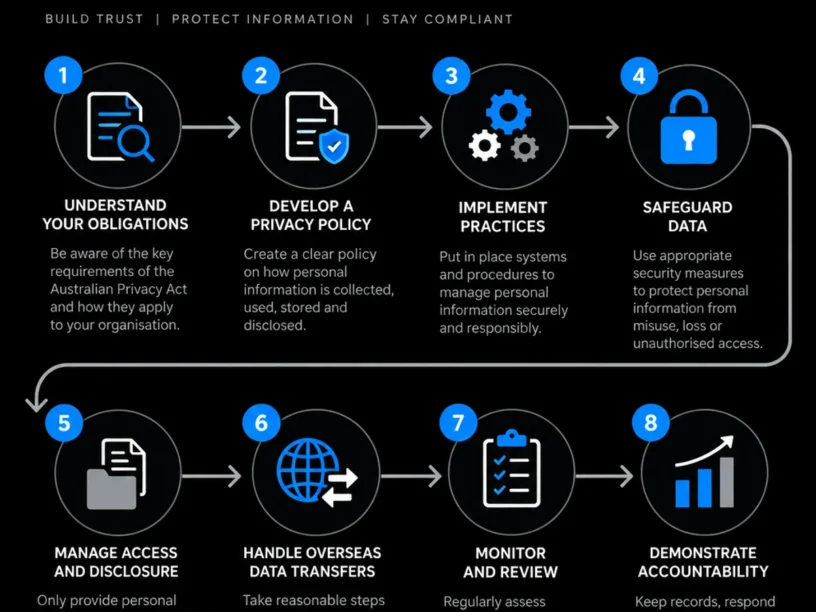
To comply with the Australian Privacy Act for app development in 2026, follow five concrete steps:
- Map every piece of personal information your app collects to understand which Australian Privacy Act obligations apply.
- Build a privacy policy that meets all 13 Australian Privacy Principles (APPs), including new APP 1.7-1.9 disclosures commencing December 2026.
- Prepare for automated decision-making disclosure rules with a hard deadline of 10 December 2026.
- Secure data in line with APP 11 and APP 8, understanding what “reasonable steps” means for data security and overseas hosting.
- Embed privacy-by-design into your development process so compliance survives every future update.
This guide walks founders and non-technical business owners through that exact path in plain English.
Prerequisites: A working app concept or existing app, a list of data fields you collect, and 6-10 weeks of combined legal and development time before launch or the December 2026 deadline. For related guidance, see AI Development Lifecycle A Startup Founders Guide To Using AI At Every Stage.
Why Australian Privacy Act Compliance Matters in 2026
Privacy enforcement in Australia has shifted from theoretical to very real. The OAIC handed down its first-ever civil penalty award of $5.8 million, followed by a landmark AUD 50 million settlement with Meta Platforms in December 2024 over disclosure of Australian users’ personal information to Cambridge Analytica without consent. These represent the new baseline for compliance.
In 2025, the OAIC received 1,205 data breach notifications, an 8% increase over 2024 (1,112 notifications), with the majority attributable to malicious or criminal activity. For app founders, the question isn’t whether the OAIC is watching-it’s whether your app will be the next data point in an enforcement action.
New subclauses APP 1.7, 1.8, and 1.9 commence 10 December 2026, introducing a transparency regime for automated decision-making. If your app uses AI, scoring, matching, or recommendation logic, you must act now. For supporting data, see Collection of personal information.
The Process at a Glance
| Step | Action | Time | Outcome |
|---|---|---|---|
| 1 | Map personal data flows and check applicability | 3-5 days | Clear data inventory and risk picture |
| 2 | Draft a compliant APP-aligned privacy policy | 1-2 weeks | Published, enforceable privacy policy |
| 3 | Prepare automated decision-making disclosures | 1-2 weeks | APP 1.7-1.9 ready before 10 Dec 2026 |
| 4 | Secure data and vet overseas hosting | 2-3 weeks | APP 11 and APP 8 controls in place |
| 5 | Embed privacy-by-design into dev workflow | Ongoing | Compliance survives every future update |
Total estimated time: 6-10 weeks for a first-time build, run largely in parallel with design and development.
Step 1: Map Your App’s Personal Information Flows
What You’re Doing
Before complying with anything, know exactly what personal information your app collects, where it goes, and why. This data map becomes the foundation for your privacy policy, security controls, and automated decision-making disclosures.
How to Do It
- List every data field: names, emails, location, payment details, health data, biometric data, behavioural data.
- Trace each field through your stack. Where does it sit? Which third-party SDKs or analytics tools touch it? Does it leave Australia?
- Identify whether your organisation is an “APP entity” under the Privacy Act. An APP entity includes most businesses with annual turnover over AUD $3 million, and many smaller health or data-trading apps regardless of size.
- Flag any feature using a computer program, algorithm, or AI model to make or substantially assist a decision about a user.
Common Mistakes
Founders often overlook third-party SDKs (push notification tools, ad networks, crash reporting) that quietly collect data. Small user bases don’t exempt apps from the Privacy Act, especially when sensitive data like health or biometric information is involved-those categories remove exemptions regardless of turnover.
What Done Looks Like
A single document listing every data field, its purpose, storage location, and every third party that touches it-your clear data inventory. For a more detailed walkthrough, see Australian privacy principles guidelines | AGA.
Step 2: Build a Compliant Privacy Policy
What You’re Doing
Your privacy policy is the legal document the OAIC and users will judge you by. It must reflect the 13 Australian Privacy Principles, not pull from a generic template.
How to Do It
- Cover collection notification (APP 5): tell users at collection what you’re gathering and why.
- Address use and disclosure (APP 6): personal information can only be used or disclosed for its original purpose unless an exception applies.
- Set out direct marketing rules (APP 7) and include a working opt-out mechanism.
- Disclose cross-border transfers (APP 8) if you use overseas-hosted cloud services.
- Have a qualified privacy lawyer or compliance platform review the draft before publishing.
Example
| Data collected | APP policy disclosure needed |
|---|---|
| Email and login details | Collection purpose, storage location, retention period |
| Location data | Specific purpose, whether shared with ad networks |
| Payment information | Processor name, cross-border disclosure if processor is overseas |
What Done Looks Like
A published, dated privacy policy linked from your app’s onboarding and app store listing, written in plain language rather than boilerplate for enforceability and transparency.
Step 3: Prepare for the Automated Decision-Making Disclosure Deadline
What You’re Doing
This is the most time-sensitive compliance requirement for 2026. If your app uses AI, scoring models, or software-driven logic affecting users, you have a hard deadline: 10 December 2026.
How to Do It
- Apply the three-part test: a computer program makes a decision (or substantially assists one); the decision could reasonably affect an individual’s rights or interests; personal information about that individual is used in the program’s operation.
- Note that human review doesn’t automatically exclude a feature from scope. The OAIC’s guidance confirms human checking is not sufficient on its own.
- Draft specific disclosures: what personal information is used and what kinds of decisions are made under APP 1.7-1.9.
- Publish the updated privacy policy clause before 10 December 2026. Start preparing before the deadline, not at the last minute.
Best Practices
Maintain a living register of every AI or rule-based feature so disclosures stay accurate as features change. Appomate helps founders identify which features trigger ADM disclosure obligations and design in-app transparency screens that satisfy them.
What Done Looks Like
Your privacy policy names each automated decision your app makes and the data behind it, verified working across both iOS and Android builds. For related guidance, see Ios App Security Best Practices For 2026 That Every App Owner Should Know.
Step 4: Secure Data and Vet Overseas Hosting
What You’re Doing
Data security (APP 11) and cross-border disclosure (APP 8) are where most enforcement action and data breaches originate, creating the largest penalties.
How to Do It
- Encrypt personal information at rest and in transit. Apply access controls based on need-to-know principles to meet Australian cybersecurity standards.
- Audit every overseas cloud provider or API your app uses. Before disclosing personal information to an overseas recipient, take reasonable steps to ensure they don’t breach the APPs. If they do, you’re treated as if you had breached them.
- Build or confirm a Notifiable Data Breach response plan: assess suspected breaches and notify the OAIC and affected users where serious harm is likely, within the statutory window.
- Where possible, choose Australian data residency for sensitive fields to eliminate cross-border assessment complexity and reduce regulatory exposure.
Common Mistakes
Teams assume reputable overseas vendors automatically satisfy APP 8 without documented due diligence or informed consent. Another mistake is treating encryption as one-time setup rather than ongoing control, leaving significant compliance gaps in new data flows added in later app versions.
What Done Looks Like
You can list every overseas recipient of personal data, show the contractual or consent basis for each transfer, and demonstrate a tested breach-response runbook.
Step 5: Embed Privacy-by-Design Into Your Development Workflow
What You’re Doing
Compliance isn’t a one-off checklist. It’s an ongoing discipline that survives every sprint, feature release, and third-party SDK update.
How to Do It
- Add a privacy review step to your sprint or release checklist. New features get assessed against the APPs before shipping.
- Tag any new feature that touches personal information or automated decisions to keep your register current.
- Work with a development partner that treats compliance as part of product strategy, not an afterthought.
- Schedule quarterly reviews of your privacy policy, data map, and NDB readiness.
Best Practices
Appomate embeds privacy and compliance from the strategy phase rather than discovering it as a launch-blocking surprise. This approach ensures compliance reviews happen alongside design sprints rather than after a build is finished.
What Done Looks Like
Every new feature ships with a documented privacy assessment. Your compliance posture improves with each release. For related guidance, see What Type Of Mobile Apps Does Appomate Build.
Ready to build your app?
Book a free Visioning Call with our team today and walk away with a clear roadmap, expert feedback, and a plan to bring your idea to life. No technical knowledge required.
What to Do After You’ve Achieved Compliance
Phase 1 (Weeks 1-4 post-launch): Monitor your Notifiable Data Breach readiness in real conditions. Confirm your automated decision-making disclosures match what actually shipped to app stores, validating your compliance framework.
Phase 2 (Months 2-6): Run a formal Privacy Impact Assessment on major new features. Review vendor contracts for APP 8 adequacy as you add integrations, helping to maintain compliance with evolving features.
Phase 3 (Annual): Reassess your privacy policy and data map annually or immediately after new OAIC guidance, ensuring your app remains compliant with the latest regulatory landscape.
Resources You’ll Need
| Resource | Role | Status | Cost |
|---|---|---|---|
| Appomate | App development partner embedding privacy-by-design from strategy to launch | Recommended | Project-based quote |
| OAIC official guidance | Authoritative source for APP interpretation and ADM guidance | Required | Free |
| NDB scheme resources | Breach assessment and notification templates | Required | Free |
| Privacy lawyer or compliance platform | Privacy policy drafting and ADM disclosure review | Required | Varies |
| Data mapping spreadsheet or tool | Track personal information flows and third-party recipients | Recommended | Free to low-cost |
See also, see Australian Privacy Principles (APPs).
Troubleshooting Common Issues
Problem: My privacy policy is a generic template without automated decision mentions
Fix: Run your feature list through the three-part ADM test and add a dedicated clause before 10 December 2026 to ensure compliance with new disclosure rules.
Problem: We don’t know if our overseas vendors meet Australian standards
Fix: Request each vendor’s data protection terms and document “reasonable steps” taken. Consider Australian-hosted alternatives for sensitive data to mitigate cross-border risks.
Problem: A new feature shipped without privacy impact review
Fix: Add a mandatory privacy review step to your release checklist to embed privacy-by-design.
Problem: We’re not sure our business needs to comply
Fix: If your app collects health, biometric, or sensitive data, those categories remove most small business exemptions regardless of turnover, meaning compliance is likely required. For more troubleshooting advice, see A Privacy Compliance Tool to Overcome Common Issues.
Conclusion
Compliance with the Australian Privacy Act comes down to five disciplined steps: map your data, write a genuinely compliant privacy policy, meet the new automated decision-making disclosure deadline, lock down security and cross-border transfers, and make privacy permanent in your development process. Treat it as a competitive advantage, not a cost centre.
Key Takeaways
- Reach full Privacy Act compliance in 6-10 weeks when the five steps run alongside design and build.
- The APP 1.7-1.9 automated decision-making disclosure deadline of 10 December 2026 is the most urgent item on any Australian app founder’s compliance list.
- Next action: start your data map this week and loop in a development partner that treats compliance as part of product strategy from day one.
FAQ
How do I comply with the Australian Privacy Act?
Map every piece of personal information your app handles and its flow and purpose. Publish a comprehensive privacy policy satisfying all 13 Australian Privacy Principles (APPs), including automated decision-making disclosures required from 10 December 2026 under APP 1.7-1.9. Secure all data under APP 11, manage overseas transfers under APP 8, and maintain a Notifiable Data Breach response plan. Most organizations achieve this in 6-10 weeks when integrated into product development.
What is the Australian Privacy Act and who does it apply to?
The Privacy Act 1988 is Australia’s primary data protection law, enforced by the Office of the Australian Information Commissioner (OAIC). It applies to most businesses with annual turnover exceeding AUD $3 million, as well as smaller organizations handling sensitive information like health data or acting as contracted service providers to government.
What happens if my app doesn’t comply with the Privacy Act?
Tier 1 administrative failures allow infringement notices up to $330,000 per contravention. Tier 2 non-serious interferences carry penalties reaching $3.3 million. Tier 3 serious interferences carry maximum penalties of $50 million, three times the benefit obtained, or 30% of adjusted turnover.
What is the December 2026 Privacy Act deadline about?
From 10 December 2026, APP 1.7-1.9 require any business using computer programs or AI to make decisions significantly affecting a person’s rights to disclose this in their privacy policy, including what data is used and what kinds of decisions are made. This introduces a new transparency regime for automated decision-making.
Does my app need a Privacy Impact Assessment?
While not legally mandatory for every app, formal Privacy Impact Assessments are best practice for features involving sensitive data, AI-driven decisions, or new overseas data flows, strengthening your defence if investigated.
How do I handle data stored on overseas servers under the Privacy Act?
Under APP 8, before sending personal information to an overseas recipient, take reasonable steps to confirm they’ll handle it per the APPs or obtain informed consent. Keeping sensitive data on Australian servers is the simplest way to reduce exposure.
Can a development agency help with Privacy Act compliance?
Yes. A development partner familiar with Australian privacy requirements, like Appomate, helps map data flows, design compliant automated decision-making disclosures, and build privacy controls into your app’s architecture from strategy and design stages, ensuring privacy is embedded from day one.
How long does Privacy Act compliance take for a new app?
Most first-time founders complete full compliance in 6-10 weeks when run alongside app design and development rather than as a separate final-stage task, allowing for thorough and integrated compliance efforts.
This guide reflects publicly available OAIC guidance and Australian privacy law commentary current as of October 2026. It is general information, not legal advice. Engage a qualified Australian privacy lawyer to review your specific app and data practices before launch.