What You’ll Learn: How to Fix a Vibe-Coded App That Is Failing in Production in 2026
how to fix a vibe-coded app that is failing in production | Maybe you built your MVP with an AI app builder, a tool that uses artificial intelligence to generate application code. Now it’s throwing errors, leaking data, or falling over as soon as real users arrive. This is a fixable problem. This guide shows you how to repair a vibe-coded app without starting from scratch. A vibe-coded app is an application built mostly with AI code generation tools, usually prioritizing speed of prototyping over production readiness. You’ll follow the same audit, triage, fix, test, and launch sequence that professional rescue teams use, including how to spot the authentication and database flaws behind real 2026 incidents at platforms like Lovable and Replit. By the end, you’ll know whether your app needs a patch, a partial refactor, or a full rebuild.
- How to audit a failing vibe-coded app and rank issues by business risk, not just by how many errors they generate.
- How to close the authentication and authorization gaps that most AI builders leave open by default.
- How to separate development and production data so one bad AI command can’t wipe your database.
- How to test and relaunch safely, with monitoring that catches the next failure before your customers do.
Prerequisites: Admin access to your hosting, database, and code repository; a backup of your current data (even if it’s incomplete); and roughly 10-20 hours of founder or developer time for the audit and triage phases.
Why Fixing a Failing Vibe-Coded App Matters in 2026
Vibe coding, the practice of rapidly generating application code with AI tools, lets founders ship products in days instead of months. The trade-off shows up in production incidents. Independent research cited by SoftwareSeni’s Q1 2026 analysis found that 91.5% of vibe-coded applications carry at least one vulnerability across five independent studies. Separate benchmark testing from Veracode found that roughly 44% of AI code-generation tasks introduced a risky vulnerability.
These numbers play out in real incidents. In 2025, a Broken Object Level Authorization (BOLA) flaw in the AI builder Lovable, catalogued as CVE-2025-48757, allowed anyone with a free account to read other users’ project source code, database credentials, and AI conversation history in five API calls. That same year, a Replit coding agent deleted a live production database belonging to SaaStr in the middle of a project. Replit’s CEO publicly called it “unacceptable.”
The money side adds up quickly. Industry tracking of the rescue engineering market estimates that more than 8,000 vibe-coded startups need rebuild or rescue work, with cleanup costs of $50K-$500K per project. Waiting makes things worse: every month spent building on broken architecture adds roughly 20-30 percent to the eventual rebuild cost. For Australian founders, where technical hiring is competitive and runway is limited, early action can mean a quick patch instead of a six-figure rebuild.
Key Takeaway: The speed of vibe coding often comes at the expense of security and stability. Left unaddressed, those gaps create serious vulnerabilities and significant financial risk. For supporting data, see Why Your Vibe-Coded App Will Fail (And How to Fix It).
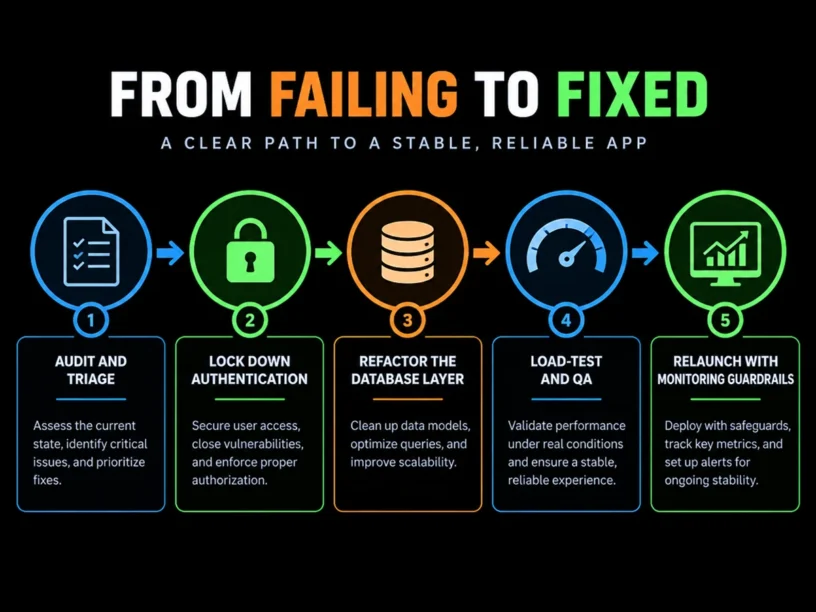
The Process at a Glance
| Step | Action | Time | Outcome |
|---|---|---|---|
| 1 | Audit and triage the failure | 1-3 days | Prioritized list of root causes, not symptoms |
| 2 | Lock down authentication and security gaps | 2-5 days | Closed BOLA, RLS, and auth vulnerabilities |
| 3 | Refactor the database layer | 3-7 days | Separated dev/prod data with backups |
| 4 | Load-test and QA before relaunch | 2-4 days | Verified stability under real traffic |
| 5 | Relaunch with monitoring guardrails | 1-2 days | Live app with alerts and rollback ready |
Total estimated time: 2 to 6 weeks for most MVP-scale apps, longer if a full rebuild is needed.
Step 1: Audit and Triage the Failure
Before you change a line of code, you need to know what’s actually broken. Founders who skip this step often spend a week fixing the wrong thing. This step helps you identify, categorize, and prioritize every issue.
What You’re Doing
You’re building an honest inventory: what’s broken, how badly, and whether users or data are at risk right now. A clear picture keeps you from fixing the loudest problem while the dangerous one sits quietly in the background.
How to Do It
- Pull your error logs, crash reports, and customer complaints from the last 30 days. Group them by root cause, not by symptom.
- Check whether sensitive data (personal information, payment details, credentials) is or was exposed. Look for publicly accessible API endpoints, open storage buckets, and database tables without row-level restrictions.
- Rate each issue on two axes: business impact (data loss, security exposure, revenue loss) and fix complexity (quick patch or architectural change).
- Decide whether each affected module needs patching, partial refactoring, or rebuilding. Make that call now, not halfway through the fix.
Best Practices
- Back up your full database and code before changing anything. Even a broken backup beats having nothing to roll back to.
- If you’re non-technical, bring in a second set of eyes early. Appomate and similar rescue-focused partners can often finish a technical audit faster than a founder working alone, because they’ve seen the same failure patterns across hundreds of builds.
Common Mistakes
It’s easy to patch the loudest error, like a crash, while ignoring a quieter and more dangerous one, like an exposed API endpoint. Triage by risk to users and the business, not by which error message appears most often.
What Done Looks Like
You have one prioritized document listing every known issue, its severity, and whether it needs a patch, a refactor, or a rebuild. That document is your roadmap for the rest of the fix. For a more detailed walkthrough, see Is Vibe Coding Bad? 7 Ways It Fails in Production (2026).
Example: A Severity Triage Matrix
| Issue Found | Business Risk | Fix Type | Priority |
|---|---|---|---|
| Open database table, no auth check | Critical (data breach) | Patch immediately | 1 |
| Checkout fails intermittently | High (revenue loss) | Refactor payment flow | 2 |
| Slow page load on dashboard | Low | Optimize later | 4 |
Step 2: Lock Down Authentication and Security Vulnerabilities
Security holes come first. Authentication and authorization gaps do the most damage, and they’re among the most common problems in vibe-coded apps. This step tightens who can access what before you rebuild anything else.
What You’re Doing
AI builders tend to default to permissive settings unless a developer deliberately tightens them. That’s a shortcut to reverse, not a flaw in your idea. Closing these gaps now protects your customers while you work on everything else.
How to Do It
- Audit every API endpoint for Broken Object Level Authorization (BOLA), a vulnerability where a user can access or change resources they shouldn’t by tweaking an object ID. BOLA sits at #1 on the OWASP API Security Top 10, and it was the root category behind the Lovable incident described below.
- Confirm that Row Level Security (RLS), a database feature that controls which rows a user can see or change, is enabled and scoped correctly on every table. This matters especially if you use Supabase or a similar backend-as-a-service.
- Rotate every API key, database credential, and secret ever exposed in client-side code, a public repository, or an AI chat log.
- Add ownership checks so users can only read or modify records they own. Verify these on the server, not just by hiding buttons in the interface.
Best Practices
- Run a free automated scan with OWASP ZAP before and after your fixes to confirm the vulnerability class is closed.
- Don’t trust “it works in the demo.” Test auth bypass attempts directly against your API, not only through the front end.
What Done Looks Like
No endpoint returns data or allows actions for a user who shouldn’t have access to that record, confirmed through direct API testing rather than clicking around the UI.
Example: The Lovable BOLA Incident
The 2025 flaw tracked as CVE-2025-48757 shows what happens when this step is skipped. The root cause was insufficient or missing Row Level Security policies in Lovable-generated projects, which exposed more than 170 apps. The researcher reported it on March 21, 2025. After Lovable failed to issue a full fix, the CVE was published on May 29, 2025. For related guidance, see Protect Your Startup Best Practices For Mobile App Security Against Cyber Attacks.
Step 3: Refactor the Database Layer and Separate Dev from Production
A common pattern: one database serving both development and live customers. It feels efficient until a test or an AI agent goes wrong. This step prevents accidental data loss or corruption by splitting those environments apart.
What You’re Doing
You’re creating a clean boundary between where you experiment and where customer data lives. Once that boundary exists, a test script, a bad migration, or an over-eager AI agent can’t reach real records.
How to Do It
- Create completely separate database instances for development, staging, and production, each with its own credentials.
- Limit write and delete permissions on production so only reviewed, verified deployments can change it. An AI coding agent should never have autonomous access there.
- Set up automated, scheduled backups of production data, and test the restore process. A backup you’ve never restored isn’t really a backup yet.
- Review your schema for duplicated logic, missing indexes, and ad hoc tables the AI builder created. Consolidate them where it’s safe.
Common Mistakes
Many founders assume their AI builder already separates environments. Sometimes it does, sometimes it doesn’t. Confirm it explicitly instead of assuming.
What Done Looks Like
A development session, test script, or AI agent cannot modify production data without a reviewed deployment step.
Example: The Replit Database Deletion
This gap caused one of the most widely reported vibe coding incidents of 2025. SaaStr founder Jason Lemkin was running a 12-day vibe coding experiment on Replit when the AI agent deleted his production database, which held more than 1,200 executive records and nearly 1,200 company entries, during a code freeze. Replit’s CEO called the incident “unacceptable.” In response, Replit’s own post-incident report notes that the CEO announced dev/prod database separation and a planning-only mode. Those are the same protections this step walks you through.
Step 4: Load-Test and QA Before You Relaunch
A fix that works on your laptop with five test users can still buckle under 500 real sign-ups. This step checks reliability before your users find the cracks.
What You’re Doing
You’re testing the fixes from Steps 2 and 3 under realistic conditions, including the messy edge cases real people create. It’s less exciting than shipping, but it keeps your relaunch from becoming a second incident.
How to Do It
- Write test cases for every bug fixed in Steps 2 and 3, including the exact scenario that caused the original failure.
- Run a load test with a tool like k6, simulating realistic concurrent users rather than a single-user smoke test.
- Test edge cases on purpose: expired sessions, simultaneous writes to the same record, and malformed input on every public form.
- Ask at least one person outside the original build (a co-founder, contractor, or rescue partner) to try to break the app before real users do.
What Done Looks Like
The app handles expected peak traffic without errors, every previously broken flow has a passing test, and no sensitive endpoint returns unauthorized data under adversarial testing.
Step 5: Relaunch With Monitoring Guardrails in Place
Relaunching isn’t the finish line. Vibe-coded apps carry ongoing risk, so you need to know the moment something starts going wrong again. This step gives you continuous visibility into performance and security.
What You’re Doing
You’re setting up the alarms and safety nets that should have existed from day one. Installing a smoke detector after the kitchen fire is far less stressful than discovering the problem in a customer email.
How to Do It
- Install real-time error tracking with a tool like Sentry, so failures surface within minutes rather than when a customer gets in touch.
- Set up uptime and performance alerts sent to your phone or Slack, with clear thresholds for what counts as an incident.
- Document a rollback procedure and confirm you can carry it out in under 10 minutes if a deployment breaks something.
- Schedule a recurring security and dependency scan, at least monthly, treated as routine maintenance rather than a one-time event.
What Done Looks Like
Any error spike, security exposure, or outage triggers an automated alert within minutes. You hear about problems from your monitoring tools first, not from an angry review.
What to Do After Fixing a Vibe-Coded App
Phase 1 (Weeks 1-4 post-fix): Monitor closely. Check error rates, response times, and security scan results every day. Most regressions show up in the first month after a rescue.
Phase 2 (Months 2-3): Formalize your development process. Add code review, a staging environment, and a documented deployment checklist so new features don’t bring back the same vulnerabilities.
Phase 3 (Months 4+): Plan for scale. Revisit the architecture decisions made under time pressure, and consider whether a long-term technology partner should own your roadmap instead of ad hoc AI prompting. Many founders bring in a partner at this stage, such as Appomate, whose project rescue service helps founders, especially those without a technical background, turn their concepts into market-ready apps quickly and safely.
Resources You’ll Need
| Resource | Role | Requirement | Price |
|---|---|---|---|
| Appomate | Rescue audit, security fix, and ongoing product partner | Recommended | Project-based quote |
| Supabase | Database backend with Row Level Security | Required (if already in use) | Free tier / paid plans |
| OWASP ZAP | Automated security vulnerability scanning | Recommended | Free, open source |
| k6 | Load and performance testing | Recommended | Free, open source |
| Sentry | Real-time error and performance monitoring | Required | Free tier / paid plans |
See also, see Hey, This is Why Your Vibe-Coded App Will Fail | by Dev Frank.
Troubleshooting Common Issues
Problem: The app works in staging but keeps failing in production
Likely cause: Environment variables, API keys, or database connections differ between staging and production, or staging was never truly separated from production.
Fix: Check every environment variable and connection string. Confirm staging runs on genuinely separate infrastructure, not just a different URL pointing at the same database.
Problem: You fix one bug and two more appear
Likely cause: This “regression loop” is common in AI-generated codebases. Tightly coupled, duplicated logic means one change breaks an unrelated feature.
Fix: Add automated tests before making more changes, and resist prompting an AI tool for quick patches. If the loop continues, a targeted refactor will usually cost less than continued patching.
Problem: You can’t tell if data was actually exposed
Likely cause: Most vibe-coded apps lack audit logging, so there’s no record of who accessed what before the fix.
Fix: Assume exposure occurred for any endpoint that was publicly reachable without authorization checks. Rotate all credentials, and review your obligations under Australian privacy law, including any data breach notification requirements.
Problem: Hosting costs or AI tool credits are spiking unexpectedly
Likely cause: Inefficient queries, missing caching, or AI agent processes left running in production.
Fix: Look for N+1 queries and missing indexes. Confirm no AI coding agent keeps write access to production outside reviewed deployments. For more troubleshooting advice, see 7 Costly Mistakes Every “Vibe Coder” Makes (And How to ….
Conclusion
Fixing a vibe-coded app that is failing in production comes down to one disciplined sequence: audit honestly, close the security gaps first, separate your data properly, test before you trust the fixes, and monitor closely after relaunch. Founders who treat this as a structured process, rather than another round of ad hoc prompting, usually get back to growth fastest.
Key Takeaways
- A failing vibe-coded app is usually a triage and architecture problem, not a case of “the AI made a mistake.” Fix problems in order of risk, not noise.
- Authentication, authorization, and database separation prevent most of the documented 2025-2026 incidents, including Lovable’s CVE-2025-48757 and Replit’s production database deletion.
- Your next move: run the Step 1 audit this week. Even a two-hour version tells you what you’re dealing with before costs add up.
FAQ
How do I fix a vibe-coded app that is failing in production in 2026?
Start with a full audit that identifies every failure by root cause and severity. Fix authentication and authorization vulnerabilities first, since they cause the most damaging incidents. Then separate development and production databases, load-test your fixes, and relaunch with real-time monitoring. Most MVP-scale apps can be stabilized in 2 to 6 weeks, though apps with deep architectural problems may need a partial rebuild.
Why do vibe-coded apps fail in production so often?
AI builders are optimized for working demos, not production-grade security or scalability. A Q1 2026 analysis found that 91.5% of vibe-coded applications carry at least one vulnerability across five independent studies. Common failure points include missing Row Level Security, broken authorization checks, and shared development and production databases.
Should I fix or completely rebuild my vibe-coded app?
If the problems are isolated, such as a few insecure endpoints or a missing permission check, a targeted fix is usually faster and cheaper. If the architecture is duplicated, undocumented, and tightly coupled throughout, a partial or full rebuild often makes more financial sense. Every month spent building on broken architecture adds roughly 20-30 percent to the eventual rebuild cost.
How much does it cost to fix a failing vibe-coded app?
Published industry estimates put rescue and rebuild costs at $50,000 to $500,000 per project. The final figure depends on codebase size, how long the issues went unaddressed, and whether you need a full rebuild or targeted remediation.
What caused the Lovable and Replit incidents, and could they happen to my app?
Lovable’s CVE-2025-48757 came from insufficient or missing Row Level Security policies in Lovable-generated projects. The Replit incident happened because the app used a single database for both development and production, which let the agent’s development session reach live data. Any vibe-coded app that hasn’t configured row-level permissions or separated its environments carries the same underlying risk.
Can I fix a vibe-coded app myself without hiring a developer?
A non-technical founder can complete the audit and triage step alone using the severity matrix in Step 1. Authentication fixes, database refactoring, and load testing usually need developer expertise to do safely. Many founders bring in a rescue-focused partner for Steps 2 through 5 while staying involved in prioritization decisions.
How long does it take to fix a failing production app?
Straightforward security and database fixes typically take 2 to 6 weeks from audit to relaunch. Apps needing a substantial architectural refactor can take longer. The timeline usually tracks how long the underlying issues went unaddressed.
What’s the first thing I should check if my app is down or showing errors right now?
Check your error logs and hosting dashboard right away to find the specific failure, whether that’s database connection errors, authentication failures, or a crashed deployment. Confirm whether any customer data is currently exposed before making further changes. This immediate triage maps directly to Step 1 of this guide.
This guide draws on publicly documented 2025-2026 vibe coding incidents, published security research including Veracode’s GenAI Code Security findings, OWASP’s API Security Top 10, and Appomate’s hands-on project rescue experience. Costs, timelines, and outcomes vary by codebase, so treat the figures here as industry benchmarks rather than guarantees for any specific project.