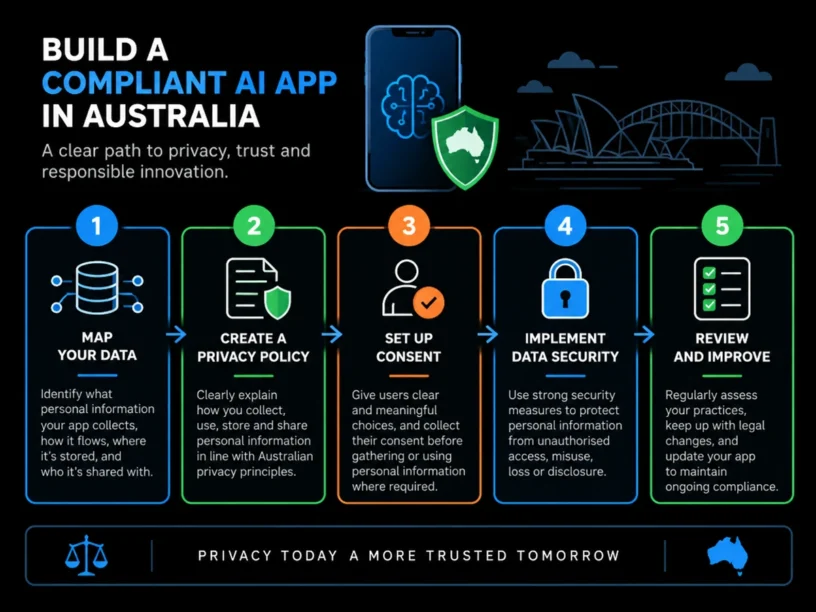
how to make an AI mobile app compliant with Australian privacy laws in 2026 | Updated November 16, 2026 | By the Appomate Team | 6-10 hours initial setup plus ongoing review | Beginner
What You’ll Learn
Making an AI mobile app compliant with Australian privacy laws in 2026 comes down to five things: mapping your personal information flows, writing a privacy policy that covers all 13 Australian Privacy Principles (APPs) including the new automated decision-making disclosures, setting up consent and cross-border controls, securing your data, and reviewing everything as your AI changes. New transparency rules under APP 1.7-1.9 commence on 10 December 2026, and founders who ignore them face serious civil penalties.
- Understand which Australian privacy obligations apply to an AI-powered mobile app in 2026.
- Learn the three-part test that decides whether your app’s algorithm counts as “automated decision-making” under the Privacy Act.
- Get a practical sequence for building a compliant privacy policy, consent flow, and data security setup.
- Know what to do if you’re using overseas AI models (like large language model APIs) inside your app.
Before you start, you need a working idea or build of your app and a rough sense of the personal information it collects, such as names, emails, location, usage behavior, or biometric data. No legal or technical background is required.
Key Takeaway: Compliance for an AI mobile app in Australia is a structured process covering data handling, policy, consent, security, and continuous review, with the new automated decision-making transparency rules as the biggest change to plan for.
Why Australian Privacy Compliance Matters in 2026
From 10 December 2026, the Privacy and Other Legislation Amendment Act 2024 introduces mandatory transparency duties for any entity that arranges for a computer program to make, or do a thing that is substantially and directly related to making, a decision that significantly affects an individual’s rights or interests. If your app personalizes recommendations, scores users, or automates approvals, this is the core of what your product does.
The financial stakes are high. A body corporate that contravenes the Privacy Act may face the greater of $50 million, three times the value of the benefit obtained from the contravening conduct, or 30% of the body corporate’s adjusted turnover during the breach period. Even lower-level infringement notices can reach approximately AUD $66,000 per breach.
The regulator isn’t waiting for the deadline. The OAIC is already running compliance sweeps of Australian app privacy policies throughout 2026. Building compliance in from day one is far cheaper than retrofitting it after a regulator’s letter arrives.
Key Takeaway: New transparency duties for AI-driven decisions become mandatory in December 2026, with heavy penalties and active scrutiny. Proactive compliance is the cheaper path. For supporting data, see Australian retailers reshape strategies to tackle privacy laws.
The Process at a Glance
| Step | Action | Time | Outcome |
|---|---|---|---|
| 1 | Map data flows and classify automated decisions | 1-2 hours | Clear picture of APP 1.7 exposure |
| 2 | Draft a privacy policy covering all 13 APPs | 2-3 hours | Published, legally compliant policy live |
| 3 | Set up consent, collection notices and cross-border controls | 1-2 hours | Lawful collection and overseas data transfer |
| 4 | Secure data and build a breach response plan | 1-2 hours | APP 11 security controls documented |
| 5 | Test, document and schedule ongoing review | 1 hour, then quarterly | Audit trail and review cadence in place |
Expect roughly 6-10 hours of focused work to get the foundations live, then quarterly reviews as your AI features change.
Step 1: Map Your AI App’s Data and Automated Decisions
Every compliance project starts with knowing what you actually collect. Most founders are surprised by how much personal data their app touches once it’s written down.
What You’re Doing
You’re identifying every piece of personal information your app collects, then working out whether any AI feature meets the legal test for “automated decision-making” under APP 1.7.
How to Do It
- List every data point your app collects: names, emails, device IDs, location, health or biometric signals, behavioral data, and any chat logs fed into an AI model.
- For each AI feature (recommendation engine, chatbot, scoring model, content moderation, personalization), apply the three-part test. APP 1.7 has three conditions: a computer program makes the decision or does something substantially and directly related to making it, personal information about the individual is used in operating that program, and the decision could reasonably be expected to significantly affect their rights or interests.
- Flag anything borderline. The requirements reach well beyond truly ‘automated’ or AI-driven decisions and may capture a broad range of software, decision-support tools, and embedded technologies.
- Record your findings in a spreadsheet with four columns: feature name, data used, decision type, and significance assessment.
Best Practices
- If you’re unsure whether a feature “significantly affects” a user, treat it as in scope. Over-disclosing costs far less than a breach.
- Bring your development partner in early. At Appomate, this mapping exercise is part of the discovery phase for every AI app build, so founders without a technical background can move from concept to market-ready app safely.
Common Mistakes
Many founders assume only “fully autonomous” AI counts. It doesn’t. A human clicking “approve” on an AI-generated score doesn’t take the system out of scope. The OAIC’s guidance says so directly: a person signing off does not take a tool out of scope.
What Done Looks Like
You have a written inventory of every data type and AI feature in your app, each assessed against the APP 1.7 test.
Example
| Feature | Data Used | In Scope? |
|---|---|---|
| AI meal recommendation engine | Dietary preferences, purchase history | Likely yes, if it drives pricing or access decisions |
| Chatbot for customer support | Chat transcripts, account ID | Depends on whether it approves or denies requests |
| Fraud or risk scoring model | Transaction history, device fingerprint | Almost certainly yes |
Key Takeaway: Map all personal data your AI app collects, apply the APP 1.7 three-part test to every automated decision feature, and document the results. For a more detailed walkthrough, see New AI and Privacy guide makes compliance easier for ….
Ready to build your app?
Book a free Visioning Call with our team today and walk away with a clear roadmap, expert feedback, and a plan to bring your idea to life. No technical knowledge required.
Step 2: Build a Privacy Policy That Covers All 13 APPs
Your privacy policy is the document the OAIC and your users will judge you by, so this is where your Step 1 work becomes visible.
What You’re Doing
You’re turning your data map into a public, legally compliant privacy policy.
How to Do It
- Start from the Australian Privacy Principles themselves, not a generic overseas template. An APP entity must have a clearly expressed and up-to-date APP Privacy Policy about how it manages personal information.
- Cover collection, use, storage, disclosure, access, and correction rights. Write in plain English.
- Add the automated decision-making disclosures required from 10 December 2026. APP entities must include information in their privacy policy where they have arranged for a computer program to make or inform decisions that significantly affect individuals’ rights or interests.
- Publish the policy somewhere free and easy to find, usually on your website, in an appropriate form.
Best Practices
- Use the OAIC’s mobile app developer guidance as your baseline. It was written for apps specifically.
- Spell out third-party data sharing, especially through ad networks or analytics providers.
Common Mistakes
The policy gets generated once and never touched again. The fix: review the policy every time you ship a new AI feature, not once a year.
What Done Looks Like
Your privacy policy is live, specific to your app’s actual AI features, and includes the automated decision-making disclosures required under APP 1.8.
Key Takeaway: Write your policy from the Australian Privacy Principles, address all 13 APPs, include the new automated decision-making disclosures, and update it whenever your product changes. For related guidance, see How To Build A Referral Program For A Mobile App 2026 Step By Step Guide 2026.
Step 3: Set Up Consent, Collection Notices and Cross-Border Data Controls
This is where compliance meets user experience. People decide whether to trust your app within the first few screens, so how you ask for data matters as much as what your policy says.
What You’re Doing
You’re making sure collection is lawful at the point of capture, and that any overseas transfer (very common with AI models) is disclosed and protected.
How to Do It
- Collect only the data your app needs to function. Skip blanket permission requests.
- Show a clear collection notice at the point data is gathered, before users submit anything sensitive.
- If your AI runs on an overseas-hosted large language model or cloud API, treat it as a cross-border disclosure under APP 8. Disclose it in your policy, including the countries data may be sent to.
- Get contractual assurances from your AI vendor covering how user data is handled and retained, and whether it’s used to train their models.
Common Mistakes
The app quietly sends user chat data to a third-party AI API with no disclosure. Founders often don’t realize that using an overseas AI model is an overseas disclosure of personal information. The fix: list every AI vendor and its data jurisdiction in your privacy policy, and check whether an APP 8.2 exception genuinely applies before you assume it does.
What Done Looks Like
Every collection point has a clear notice, and every overseas AI dependency is disclosed and covered by contract.
Key Takeaway: Give clear notices at collection, and manage overseas AI transfers by disclosing vendors and jurisdictions and securing written assurances.
Step 4: Secure Data and Build a Breach Response Plan
Security is the step founders most want to skip, and it protects your users and your business when things go wrong. It doesn’t have to be complicated. It has to be deliberate and written down.
What You’re Doing
You’re putting safeguards around the personal information your AI app holds and preparing for the day something goes wrong.
How to Do It
- Encrypt personal data at rest and in transit, and limit access to systems that actually need it.
- Practice data minimization. Don’t keep AI training logs or chat histories longer than necessary.
- Write a Notifiable Data Breach response plan. Decide who assesses a suspected breach, how quickly, and how affected users and the OAIC will be notified. A Notifiable Data Breach is an eligible data breach likely to result in serious harm to any affected individual, and it must be reported to the OAIC and those individuals.
- Run a tabletop exercise before launch. Walk through a realistic breach scenario and note the gaps.
Best Practices
- Treat your AI vendor’s security as part of your own risk. A breach on their end is still your compliance problem.
- Document every security control so you can show you took “reasonable steps” if the OAIC asks.
What Done Looks Like
You have documented security controls and a written, tested breach response plan before you have real users.
Key Takeaway: Put encryption, access controls, and data minimization in place, and test your Notifiable Data Breach plan before launch.
Step 5: Test, Document and Schedule Ongoing Review
For an AI app, launch day is the starting line. Models get retrained, features get added, and vendors change their terms. Compliance has to keep up.
What You’re Doing
You’re building an ongoing compliance habit, not completing a one-off task.
How to Do It
- Run a pre-launch privacy review against your Step 1 data map. Confirm every disclosure matches what the app actually does.
- Set a recurring quarterly review to recheck your APP 1.7 classification whenever you add or change an AI feature.
- Keep a compliance log recording what changed, when, and who reviewed it.
- Monitor OAIC updates. guideline versions have already been updated through 2026 to reflect the new transparency obligations.
What Done Looks Like
You have a recurring calendar reminder, a compliance log, and confidence that your next AI feature won’t quietly create new legal exposure.
Key Takeaway: Keep compliance running after launch with pre-launch reviews, quarterly checks, a compliance log, and regular monitoring of OAIC guidance.
What to Do After Completing the Compliance Process
Phase 1 (Weeks 1-4): Launch and monitor. Get your compliant MVP live, watch early user feedback for privacy complaints, and track OAIC guidance updates affecting your AI features.
Phase 2 (Months 2-6): Independent review. Commission an external privacy or security audit before the 10 December 2026 deadline, especially if you’ve added AI capabilities since launch.
Phase 3 (Ongoing): Build governance into development. Run a lightweight privacy impact assessment for every new AI feature, train your team on the APPs, and review your policy at least annually or after any major architecture change.
Resources You’ll Need
| Resource | Role | Status | Price |
|---|---|---|---|
| Appomate | Development partner that builds AI-native app architecture with compliant data handling by default | Recommended | Project-based |
| OAIC Australian Privacy Principles Guidelines | Authoritative legal reference for all 13 APPs | Required | Free |
| OAIC APP 1.7-1.9 Transparency Fact Sheet | Specific guidance on automated decision-making disclosures | Required | Free |
| OAIC Mobile Privacy Guide for App Developers | App-specific checklist for privacy policies and data handling | Recommended | Free |
| Independent privacy or data protection lawyer | Legal sign-off on policy wording and risk exposure | Recommended | Varies |
See also, see How to Comply with the Australian Privacy Act: Step-by- ….
Common Plateaus and How to Break Through
Plateau: The privacy policy still reads like a generic template
Likely cause: It was generated by a free tool and never customized for your AI features or the APP 1.7-1.9 requirements.
Fix: Audit the policy line by line against your Step 1 data map, and describe each AI-driven decision your app makes.
Plateau: Unsure if your algorithm counts as “automated decision-making”
Likely cause: You assume the rule only applies to fully autonomous systems with no human involved.
Fix: Apply the three-part test from Step 1. It catches decisions where a computer program does something “substantially and directly related to making the decision”, not only solely automated ones.
Plateau: You’re using an overseas AI API and haven’t disclosed it
Likely cause: You treat a third-party AI vendor as “just infrastructure” rather than an overseas disclosure of personal information.
Fix: List the vendor, where its data is located, and its retention practices in your policy, then confirm in writing how user data is used.
Plateau: No one owns compliance after launch
Likely cause: Compliance was treated as a pre-launch task instead of an ongoing responsibility.
Fix: Assign a named person (even a founder wearing several hats) to own quarterly reviews and keep the compliance log current.
Key Takeaway: Most blockers come down to four things: a generic policy, a narrow reading of “automated decision-making,” an undisclosed overseas AI vendor, or no clear owner after launch. For more troubleshooting advice, see New AI rules target breaches – Government News.
Conclusion
Making an AI mobile app compliant with Australian privacy laws in 2026 isn’t about becoming a lawyer. It’s about following a repeatable process: map your data and decisions, publish a specific privacy policy, control consent and cross-border flows, secure your data, and keep reviewing. Build it in from day one, and the December 2026 deadline becomes a checkpoint instead of a scramble.
Key Takeaways
- You now have a 5-step framework covering data mapping, policy drafting, consent, security, and ongoing review, built around Australia’s new APP 1.7-1.9 automated decision-making rules.
- Almost any AI feature that uses personal data to influence a meaningful outcome for a user probably falls under the new transparency obligation. Disclose generously rather than narrowly.
- Start with Step 1 this week. Update your data map before you touch your privacy policy wording. If you’d rather not retrofit compliance later, consider a team like Appomate that builds it into the architecture from the start.
FAQ
How do I make an AI mobile app compliant with Australian privacy laws?
Map every piece of personal information your AI features use, test each feature against the three-part APP 1.7 test, and publish a privacy policy covering all 13 APPs, including the automated decision-making disclosures that commence on 10 December 2026. Set up consent and cross-border controls for overseas AI vendors, secure your data, and schedule quarterly reviews.
What is APP 1.7 and does it apply to my AI app?
APP 1.7 is a new Australian Privacy Principle requiring your privacy policy to disclose automated decisions using personal information that could significantly affect someone’s rights or interests. From 10 December 2026, an APP entity must include additional information in its APP Privacy Policy if it arranges for a computer program to use personal information to make decisions that could reasonably be expected to significantly affect the rights or interests of an individual. If your app personalizes pricing, scores users, or automates approvals using personal data, it almost certainly applies.
When do the new automated decision-making rules take effect in Australia?
New privacy obligations requiring disclosure of certain automated decision-making processes commence on 10 December 2026. There’s no grace period.
What are the penalties for non-compliance with Australian privacy laws in 2026?
Penalties scale with severity. Non-compliance with the Privacy Act could result in fines of $62,600 per offense, and significantly more, up to the greater of $50 million, three times the benefit obtained, or 30% of turnover, for serious interference with privacy. The OAIC can also issue compliance and infringement notices well before a matter reaches civil penalty action.
Does the Privacy Act apply to small business AI apps in Australia?
It depends on turnover and activity. As at late 2026, the long-standing $3 million small business exemption has not been formally repealed. Repeal of the small business exemption was deferred to a further tranche of reform, with no Bill introduced as of August 2026. Businesses that trade in personal information or operate as health service providers are covered regardless of turnover, so most data-driven AI apps should build compliance in anyway.
Can I use overseas AI APIs like large language models and stay compliant?
Yes, but treat the transfer as a cross-border disclosure under APP 8, disclose it clearly in your privacy policy, and get contractual assurances about data handling, retention, and whether user data is used for model training. Failing to disclose an overseas AI dependency is one of the most common gaps founders miss.
How long does it take to make an app privacy compliant?
For most early-stage apps, the foundational work takes roughly 6 to 10 hours of focused effort, followed by quarterly reviews. More complex apps with multiple AI vendors or sensitive data may need a few extra days plus legal review.
Do I need a lawyer to make my AI mobile app compliant?
You don’t strictly need one to get started, since the OAIC publishes free, detailed guidance. For sign-off on final policy wording and risk exposure, especially with penalties that can reach tens of millions of dollars, an independent privacy lawyer’s review is strongly recommended before launch.
This guide synthesizes publicly available OAIC guidance and legal commentary current as of November 2026 and is provided for general informational purposes only; it does not constitute legal advice. Founders should confirm current requirements with the OAIC or a qualified privacy lawyer before launch.