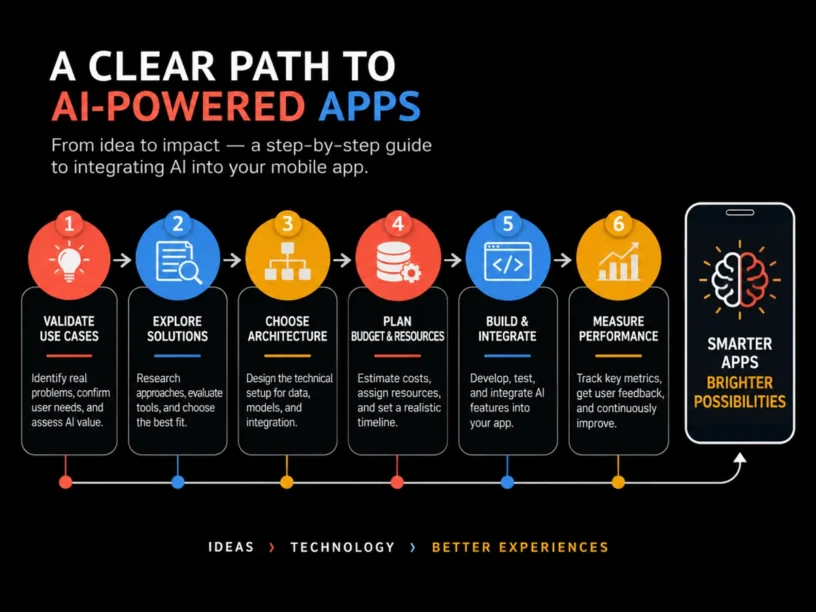
How to Successfully Integrate AI Into Your Mobile App: A Product Owner’s Planning Guide | Updated October 2026 | Appomate Team | 6-12 weeks planning-to-launch | Beginner
What You’ll Learn
Successfully integrating AI into your mobile app means validating a specific use case first, choosing the right architecture (API, on-device, or custom model), budgeting realistically, building with an experienced partner, then measuring what works. This guide is built for non-technical founders and growing businesses who want a clear process without needing a data science background. You’ll learn: For related guidance, see Wellness App Development Cost In Australia What First Time Founders Should Budget In 2026.
- How to pick an AI feature that solves a real user problem
- The difference between API-based, on-device, and custom-trained AI, and which fits your budget
- Realistic 2026 cost ranges
- How to find a development partner who builds AI-native products, not AI “wrappers”
Why AI Integration Matters in 2026
AI is no longer a differentiator, it’s the baseline. Research from Primotech shows that 70% of mobile apps now run AI features in production, and 63% of developers have integrated AI into their apps. The AI app sector generated $18.5 billion in revenue last year, up 273% year over year.
Apps using AI personalization report up to 62% higher engagement and 80% higher conversions than non-AI apps, while apps with AI-powered recommendation engines report 86% improvement in customer retention. Gartner-backed research projects that 40% of enterprise applications will feature task-specific AI agents by the end of 2026, up from less than 5% in 2025.
However, RevenueCat’s analysis of 75,000 subscription apps found the top 5% of newly launched apps generate $8,880 in their first year, while the bottom 25% earn $19 or less. Success hinges on strategic execution, not just adoption.
The Process at a Glance
| Step | Action | Time | Outcome |
|---|---|---|---|
| 1 | Validate one AI use case tied to a user problem | 1-2 weeks | A clear, testable AI feature brief |
| 2 | Choose your AI architecture and integration model | 3-5 days | Confirmed technical approach and vendor shortlist |
| 3 | Budget the real cost and ROI case | 1 week | Approved budget and ROI timeline |
| 4 | Build an AI-native MVP with a trusted partner | 6-10 weeks | Working, testable AI feature in your app |
| 5 | Launch, measure, and iterate | Ongoing, first review at 4-6 weeks | Data-backed decision to scale or refine |
Total estimated time: roughly 10-16 weeks from first planning session to a live, measurable AI feature.
Step 1: Validate the AI Use Case Before You Build Anything
What You’re Doing
Identify one specific, high-value problem that AI can solve for your users. Avoid deciding “we need AI” and then reverse-engineering a use case afterward.
How to Do It
- List your top three user pain points: drop-off moments, repetitive manual tasks, or difficult decisions.
- Map each pain point to a known AI capability: recommendations, natural language processing, computer vision, or predictive analytics.
- Score each option based on user impact, data availability, and build complexity.
- Write a one-page feature brief detailing the problem, AI solution, and the specific metric it should move.
- Test the concept with 5-10 real users before committing engineering time.
Best Practices
- Pick the feature with the clearest, most measurable win first.
- Ensure you have, or can access, the data an AI feature needs.
Common Mistakes
Founders often choose trendy AI features like generic chatbots because competitors have them, rather than because users need them. Industry data shows around 44% of mobile apps use AI personalization, meaning deliberately chosen personalization-driven features still have differentiation potential. For related guidance, see 10 Biggest Mistakes First Time Founders Make Mobile App User Experience.
Step 2: Choose the Right AI Architecture and Integration Model
What You’re Doing
This decision shapes your cost, speed to market, and data privacy posture. Choose whether the AI will run via a third-party API, on-device processing, or a custom-trained model.
How to Do It
- Start with pre-trained API integration using OpenAI, Google Vision, or Firebase ML Kit if you need to validate quickly and cheaply.
- Consider on-device inference if privacy or latency matters. Apple Intelligence lets apps use on-device AI models while keeping sensitive data exclusively on the device.
- Only move to a custom-trained model once you have proven demand and proprietary data worth training on.
- Confirm your chosen approach supports both iOS and Android.
- Shortlist two to three development partners experienced in the architecture you’ve chosen.
Example
| Architecture | Best For | Typical Timeline |
|---|---|---|
| Pre-trained API | Fast MVP, chatbots, recommendations | 6-10 weeks |
| On-device / edge AI | Privacy-sensitive or low-latency features | 3-5 months |
| Custom-trained model | Proprietary data, domain-specific accuracy | 6-12 months |
Research from The Droids on Roids found that basic pre-trained API integration typically takes 6-10 weeks, intermediate custom model work takes 3-5 months, and advanced multi-model architecture takes 6-12 months.
Step 3: Budget the Real Cost and Build Your ROI Case
What You’re Doing
Set a realistic AI development cost and ROI timeline to secure budget and avoid mid-project funding gaps.
How to Do It
- Match your chosen architecture to current market rates (see table below).
- Add ongoing costs: API usage fees, cloud hosting, and model retraining if applicable.
- Set a realistic ROI window. Most AI features need time to accumulate usage data before they pay off.
- Build in a 15-20% contingency for scope changes.
Example
| Scope | Cost Range (AUD equivalent) | Timeline | ROI Window |
|---|---|---|---|
| Basic (pre-trained API) | $20,000-$60,000 | 6-10 weeks | 6-12 months |
| Intermediate (custom model + optimization) | $60,000-$120,000 | 3-5 months | 9-15 months |
| Advanced (multi-model, deep learning) | $120,000-$200,000+ | 6-12 months | 12-24 months |
The Droids on Roids found that AI feature development costs range from $20,000 for basic integrations to over $200,000 for custom deep learning systems, with most implementations achieving positive ROI within 6-12 months. Tekrevol’s 2026 breakdown notes that AI integration is now a standard line item, with a third-party AI API typically adding $8,000 to $40,000, and a custom-trained model adding $50,000 or more.
Common Mistakes
Many founders budget only for the build and forget ongoing costs. Token and inference fees can run from hundreds to several thousand dollars monthly depending on volume.
Step 4: Build an AI-Native MVP With the Right Development Partner
What You’re Doing
Turn the validated use case into a working, testable feature, built AI-native from the start-designed around the AI capability, not retrofitted onto an existing app.
How to Do It
- Brief your chosen partner with the one-page feature brief from Step 1 and the architecture decision from Step 2.
- Insist on a scoped Minimum Viable Product (MVP): one AI feature cleanly integrated, not an AI-everything build.
- Set a clear launch milestone. Six to ten weeks for API-based features is realistic.
- Build in Quality Assurance (QA) cycles for AI output quality, not just standard app testing.
Best Practices
Appomate is a Melbourne-based app development company that empowers founders to innovate and transform concepts into market-ready apps quickly. Appomate builds AI-native products, not AI wrappers: an AI-native app is designed around the AI capability from the ground up, while an AI wrapper simply bolts a third-party API onto an existing interface. They’ve helped founders go from idea to market in as little as 6 weeks, backed by over 250 apps for clients like Adidas, L’Oreal, Lend Lease, and Hoyts.
Common Mistakes
Hiring a generalist agency that bolts a chatbot API onto your app without understanding your data or architecture results in a feature that feels bolted-on rather than native. For related guidance, see Understanding Minimum Viable Product Apps Key To Success.
Ready to build your app?
Book a free Visioning Call with our team today and walk away with a clear roadmap, expert feedback, and a plan to bring your idea to life. No technical knowledge required.
Step 5: Launch, Measure, and Iterate on Real User Data
What You’re Doing
Release the AI feature to real users and track the metric you defined in Step 1. Decide whether to scale, refine, or pivot based on actual behavior.
How to Do It
- Launch to a smaller cohort first: a percentage rollout or beta group.
- Track your core metric daily for the first two weeks, then weekly thereafter.
- Compare AI-feature users against a control group where possible.
- Review at the 4-6 week mark to decide whether to scale, refine, or pivot.
What to Do After Integrating AI Into Your App
Phase 1 (Weeks 1-6): Monitor adoption and output quality closely. Fix obvious friction points and resist adding a second AI feature before the first proves itself.
Phase 2 (Months 2-4): Expand based on data. Deepen a recommendation engine’s personalization or optimize inference costs as usage scales.
Phase 3 (Months 5+): Consider a second AI use case from your original shortlist, backed by proven internal process and an established development partner. For supporting data, see Top 8 AI Trends Shaping the Future of Mobile Apps in 2025.
Resources You’ll Need
| Resource | Role | Requirement | Price |
|---|---|---|---|
| Appomate | End-to-end development partner for strategy, design, build, and launch | Recommended | Project-based, startup-friendly pricing |
| OpenAI API | Pre-trained language model for chat, summarization, or content | Required for NLP features | Pay-per-token usage |
| Firebase ML Kit | On-device and cloud ML for vision and text recognition | Optional | Free tier plus usage-based pricing |
| Google Cloud Vision API | Pre-trained computer vision for image-based AI features | Optional | Pay-per-call pricing |
| RevenueCat | Subscription and in-app purchase analytics to track ROI | Recommended | Free tier plus paid plans |
See also, see How AI is Transforming Mobile App Development 2026?.
Common Plateaus and How to Break Through
Problem: The AI feature is built but nobody uses it
Cause: The feature was chosen based on trends rather than a validated user problem.
Fix: Revisit Step 1. Talk to ten active users directly and reposition the feature based on what they actually struggle with.
Problem: AI costs are spiraling month to month
Cause: Usage-based API pricing wasn’t modeled properly, or the feature calls the AI model more often than necessary.
Fix: Cache repeat queries, batch requests, and consider shifting simple tasks to cheaper models while reserving advanced models for complex requests.
Problem: AI outputs feel generic or off-brand
Cause: The default model prompt wasn’t tailored to your product’s tone, data, or user context.
Fix: Invest in prompt engineering, and where volume justifies it, lightweight fine-tuning or retrieval-augmented generation (RAG), which enhances AI responses by retrieving information from your own content.
Problem: The build is taking far longer than estimated
Cause: Scope crept from one AI feature to several, or the architecture was more ambitious than the validated use case required.
Fix: Pull back to the original MVP scope, ship it, and treat additional AI capabilities as Phase 2 and 3 work. For more troubleshooting advice, see 10 AI Features Every Mobile App Should Have in 2026.
Conclusion
Successfully integrating AI into your mobile app in 2026 requires disciplined validation, the right architecture choice, realistic budgeting, and a development partner who builds AI-native products. This framework applies to your first AI feature and every one after it.
Key Takeaways
- You now have a five-step framework: validate, choose architecture, budget, build, measure.
- Success depends on whether the feature solves a real, validated user problem-not the AI technology itself.
- Your next action: write your one-page AI feature brief this week and test it with five real users before writing code.
FAQ
How do you successfully integrate AI into your mobile app in 2026?
Validate one specific user problem AI can solve, choose the right architecture (pre-trained API, on-device model, or custom model), budget for both build and ongoing costs, build a scoped MVP with an experienced AI-native partner, and measure usage data for 4-6 weeks before scaling.
How much does it cost to add AI to a mobile app?
Basic pre-trained API integrations typically run $20,000-$60,000, intermediate custom features run $60,000-$120,000, and advanced multi-model systems can exceed $200,000, with most projects landing in the $60,000-$150,000 range and reaching positive ROI within 6-12 months.
Should I use a third-party AI API or build a custom model?
Start with a third-party API to validate demand quickly and affordably. Only invest in a custom-trained model once you have proven usage and proprietary data that justifies the higher cost and longer timeline.
How long does it take to integrate AI into an existing app?
Basic AI features using pre-trained APIs typically take 6-10 weeks, intermediate custom integrations take 3-5 months, and advanced custom deep learning systems can take 6-12 months.
What is a realistic ROI timeline for AI features in a mobile app?
Most organizations see positive ROI within 6-12 months for basic AI integrations, extending to 12-24 months for advanced, custom-trained AI systems.
What AI features should a first-time founder prioritize?
Prioritize the single AI feature that addresses your most measurable user pain point, typically recommendation engines, chat-based support, or predictive personalization.
Do I need a technical co-founder to integrate AI into my app?
No. Non-technical founders can successfully integrate AI by partnering with an experienced development company that handles strategy, architecture, and build quality.
What’s the difference between an “AI-native” app and an “AI wrapper”?
An AI wrapper bolts a third-party API onto an existing interface with minimal integration, while an AI-native app is designed around the AI capability from the ground up, resulting in a more seamless user experience and better long-term performance.