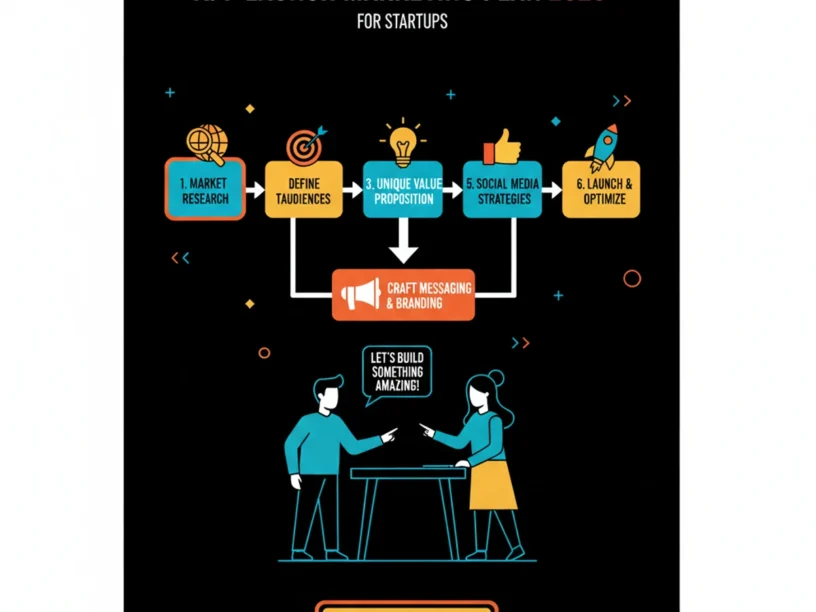
Updated: July 2026 | Author: Appomate Editorial Team | Time Required: 4–6 weeks of focused execution | Difficulty: Beginner
What You’ll Learn
This guide provides a complete blueprint for building a startup app marketing plan covering pre-launch audience building through launch day execution to post-launch retention. You’ll have a clear, stage-by-stage plan you can start acting on today, even without marketing experience.
- How to define your audience, positioning, and measurable goals before spending on ads
- How to build pre-launch buzz through a waitlist, content, and community
- How to optimise your app store listing for organic discovery
- How to execute a coordinated launch-day campaign and double down on retention
Prerequisites: You have an app idea, an MVP in development, or a product ready to launch. No marketing or technical background required.
Why an App Launch Marketing Plan Matters in 2026
In 2025, users downloaded 142.2 billion apps worldwide. Yet the Apple App Store contains 1.96 million apps and Google Play offers 2.87 million more. For any new product, visibility is the first and hardest battle. 95% of apps fail within their first year due to poor launch execution.
Customer acquisition costs have risen roughly 263% over nine years and another 18.4% in 2025 alone. What most founders discover too late is that referral systems, push notification infrastructure, analytics tracking, and onboarding flows need to be architected into the app during development, not bolted on after launch.
For Australian startup founders, the timing is compelling. Australian brands spent A$830 million on influencer marketing over the past twelve months — a 13.5% year-on-year rise — with the market on track to pass $1 billion during 2026. A structured marketing plan converts this opportunity into real growth. For supporting data, see App Marketing Plan (2026).
The Process at a Glance
| Step | Action | Time | Outcome |
|---|---|---|---|
| 1 | Define your audience and positioning | 1–3 days | Clear ICP, UVP, and launch goals set |
| 2 | Build pre-launch buzz and waitlist | 4–8 weeks before launch | Warm audience ready on launch day |
| 3 | Optimise your app store listing (ASO) | 1 week | Organic discovery engine activated |
| 4 | Execute a coordinated launch campaign | Launch week | Download spike and early social proof |
| 5 | Measure, retain, and iterate | Ongoing from Day 1 | Retention loop and sustainable growth |
Total time to first meaningful results: 6–8 weeks from plan creation to post-launch optimisation cycle
Step 1: Define Your Audience, Positioning, and Goals
What You’re Doing
Before writing marketing copy or setting a budget, define exactly who you’re talking to, why your app solves their problem best, and what “success” looks like in numbers. This foundation underpins every channel and dollar spent.
How to Do It
- Identify your Ideal Customer Profile (ICP). Go beyond demographics. Describe the specific situation, pain, and alternatives your user faces. A narrow ICP like “20-person creative agencies using Figma” converts 3–5x better than “small businesses.”
- Write your Unique Value Proposition (UVP). Use the format: “[Product] helps [ICP] achieve [outcome] without [existing pain].” Test it on five real people. If they can’t repeat it back, rewrite it.
- Set measurable launch goals. Define specific targets for downloads, Day-7 retention, and revenue within 30 days.
- Research your competitors. Download their apps, read reviews, and identify recurring complaints — these are your positioning opportunities.
Example
| Element | Weak Version | Strong Version |
|---|---|---|
| ICP | “Busy professionals” | “Solo physiotherapists in Australia managing 30+ client bookings per week” |
| UVP | “The best booking app” | “Helps solo physios cut admin time by 40% without switching from their current calendar” |
| Launch Goal | “Get lots of downloads” | “500 installs in month 1, 30% Day-7 retention, 50 paid conversions by week 8” |
What Done Looks Like
You have a one-paragraph ICP description, a single-sentence UVP, and three to five specific, time-bound launch goals written down. For a more detailed walkthrough, see How to Create a Marketing Plan: A Step-by-Step Guide ….
Ready to build your app?
Book a free Visioning Call with our team today and walk away with a clear roadmap, expert feedback, and a plan to bring your idea to life. No technical knowledge required.
Step 2: Build Pre-Launch Buzz and a Waitlist
What You’re Doing
Start building your audience 90 days before launch, not the week of. Build an audience before you need one so launch day has momentum instead of starting from zero.
How to Do It
- Create a pre-launch landing page.
An engaging landing page collects potential user emails before launch. Carrd and Webflow make this fast and free. - Set up a waitlist with referral mechanics. Use tools like LaunchList or GetWaitlist. Referral mechanics drive a large share of pre-launch growth, turning each signup into a micro-promoter.
- Choose one or two social channels and go deep.
For developer tools, focus on Twitter/X and Indie Hackers. For consumer apps, Instagram and TikTok. For B2B, LinkedIn. Pick 1–2 channels and dominate rather than spread thin. - Build in public.
Post your progress and decisions as you work — this turns development into marketing. By launch day you can have hundreds of people who feel invested in your success. - Pursue micro-influencer partnerships early.
Nano and micro creators are affordable with engaged audiences. Start with a few matched creators, track results, and scale what works. - Reach out to press and bloggers.
Build relationships 3+ weeks before launch. Offer exclusive angles and embargoed access with a strong why-now narrative. Personalised pitches outperform press releases.
Best Practices
- Warm your email list with regular updates — silence between signup and launch causes drop-off.
- Survey waitlist signups about pain points before finalising messaging.
- Only move to paid ads once organic conversion rate is above 25%.
What Done Looks Like
You have a live landing page with a working waitlist, consistent social posting, and a list of 300–1,000+ warm signups ready for launch announcement.
Step 3: Optimise Your App Store Listing (ASO)
What You’re Doing
App Store Optimisation improves a mobile app’s visibility and conversion rate in app stores through keyword optimisation, metadata, screenshots, and reviews. This is your single most cost-effective acquisition channel.
How to Do It
- Research your keywords.
Identify what terms your target users search for. AppTweak and MobileAction help validate search volume. - Optimise your title and subtitle.
Include your most important, high-volume keywords. For example, instead of “Luna,” use “Luna: Sleep Tracker & Meditate.” - Know the platform differences.
Apple App Store has a 100-character keywords field in App Store Connect for indexed search terms. Google Play indexes visible description text heavily with no hidden keywords field. - Design high-converting screenshots and preview videos.
Screenshots and ratings provide social proof. Weak creatives undermine discovery advantages. - Target long-tail keywords.
Longer, more specific phrases face less competition and bring more targeted traffic.
Best Practices
- Both stores emphasise post-install behaviour. Apps retaining users for 7+ days see stronger sustained rankings.
- Over 65% of all app installs come from app store search. A well-optimised listing can increase organic downloads by 30–50% within the first month without spending on ads.
What Done Looks Like
Your app store listing has a keyword-rich title, compelling subtitle, structured description, five high-quality screenshots, and a keyword tracking tool monitoring rankings from day one.
Step 4: Execute a Coordinated Launch Campaign
What You’re Doing
Orchestrate a promotion blitz across every channel simultaneously so algorithms, press, and audiences all notice at once. Don’t quietly publish and hope for discovery.
How to Do It
- Send your launch email blast. Email your entire waitlist on launch day with a clear single call to action: download the app. Segment your list so most engaged signups hear first.
- Activate paid acquisition — carefully.
Expect approximately $1.42 per install on Apple Search Ads and around $3.75 per install on Facebook ads. Start with Apple Search Ads for iOS — they capture high-intent users already searching in the store. Apple Search Ads typically convert at 3x the rate of social ads. - Publish your content and influencer collateral.
Schedule teaser videos, countdowns, and influencer posts for launch day or the day before. - Submit to app review sites and Product Hunt. Tech media and community sites generate a concentrated burst of high-quality downloads that signal momentum to store algorithms.
- Encourage early reviews actively. Ask beta users and waitlist to leave ratings within 48 hours. 90% of featured App Store apps are rated 4.0+, so social proof is a gateway to editorial visibility.
Example: Launch Week Channel Mix
| Channel | Action | Goal |
|---|---|---|
| Email (waitlist) | Launch announcement + download CTA | Convert warm leads into Day-1 installs |
| Apple Search Ads | Brand + category keyword campaigns | Capture high-intent in-store searches |
| Instagram / TikTok | Micro-influencer posts + Reels | Social proof and awareness spike |
| LinkedIn (B2B apps) | Founder story post + product demo | Professional credibility and referrals |
| PR / Media | Pre-briefed launch story embargo lifted | Third-party credibility and SEO backlinks |
Common Mistakes
Over-promising features in launch marketing.
Marketing capabilities your app doesn’t deliver creates negative reviews that tank rankings permanently. Only promise what version 1.0 actually does.
What Done Looks Like
By end of launch week, you have a measurable download spike, at least 10–20 public reviews in the store, and active analytics data showing where users came from and what they did next.
Step 5: Measure, Retain, and Iterate
What You’re Doing
Your first 30 days determine long-term trajectory more than any other period. Most founders treat launch as the finish line and skip this critical phase.
How to Do It
- Set up analytics from Day 1. Tools like Mixpanel and Firebase track Day-1, Day-7, and Day-30 retention; session length; and feature engagement.
- Track retention by cohort, not just aggregate.
Cohort analysis groups users by signup date and tracks each group independently. A weekly cohort view shows whether Week 12 users retain differently than Week 8 — revealing what changed. - Optimise your onboarding flow.
Forcing registration before value delivery is a major retention killer. Apps reducing registration friction improve onboarding completion by over 20%. - Respond to reviews within 48 hours. Every response signals to new users and the algorithm that the app is actively maintained.
- Run a 30-day post-launch retrospective. Compare actual downloads, retention, and revenue against your goals from Step 1. Document what worked, what failed, and top three priorities for next iteration.
Best Practices
- Retention signals whether your product delivers repeatable value.
- Measure cost-per-retained-user, not just cost-per-install. A channel at $4 CPI with 5% Day-30 retention costs $80 per retained user. A channel at $6 CPI with 15% Day-30 retention costs $40 per retained user — half the price.
What Done Looks Like
You have a live analytics dashboard, documented retention baseline by cohort, and a prioritised backlog of product and marketing improvements informed by real user behaviour.
What to Do After Completing Your App Launch Plan
Phase 1 — Consolidate (Weeks 5–8): Analyse your first cohort’s retention data, respond to every review, and shut off paid channels not meeting your cost-per-retained-user target. Focus budget on top-performing channels.
Phase 2 — Scale (Months 2–3): Once Day-30 retention is stable, increase paid acquisition spend. Introduce email lifecycle sequences to re-engage dropped users. Begin pursuing long-tail ASO keywords. Expand influencer programme with creators who drove quality installs.
Phase 3 — Optimise and Grow (Month 4 onwards): Run A/B tests on app store creatives, onboarding flow, and push notification copy. Build referral or loyalty mechanics into the product. A 5% retention increase can lead to 25–95% profit increases.
Resources You’ll Need
| Resource | Role in This Process | Required / Recommended | Price |
|---|---|---|---|
| Appomate | Full-service app development and launch partner for Australian founders | Recommended | Contact for quote |
| AppTweak | ASO keyword research and listing optimisation | Recommended | From USD $69/month |
| LaunchList | Pre-launch waitlist software with referral mechanics | Recommended | Free tier available; paid from USD $19 one-time |
| Mixpanel | Product analytics — cohort retention tracking and funnel analysis | Required | Free up to 20M events/month |
| Kit (formerly ConvertKit) | Email marketing for waitlist and lifecycle campaigns | Recommended | Free up to 10,000 subscribers |
See also, see From Idea to Launch: How to Build a Startup App Without …. For related guidance, see Ai Development Lifecycle A Startup Founders Guide To Using Ai At Every Stage.
Troubleshooting Common Issues
You Launch to Near-Zero Downloads
Likely cause: No pre-launch audience was built.
Fix: Don’t restart paid ads immediately. Spend two to four weeks building a waitlist and activating one social channel before another acquisition push. Only run paid ads once organic conversion rate exceeds 25%.
Good Downloads But Poor Day-7 Retention
Likely cause: Your onboarding creates friction or your app doesn’t deliver core value fast enough.
Fix: Audit your onboarding flow using session recordings (tools like UXCam). Identify where most users drop off. Reduce registration friction and get users to their first meaningful moment of value within 60 seconds.
ASO Rankings Are Not Moving After 4 Weeks
Likely cause: You’re targeting high-competition keywords or your post-install retention signals are weak.
Fix: Switch to lower-competition long-tail keywords. Simultaneously address retention issues so post-install behaviour sends positive signals to the algorithm.
Paid Ads Are Burning Budget With No Conversions
Likely cause: Your ad creative or targeting doesn’t match your ICP, or you’re optimising for installs rather than retained users.
Fix: Pause all campaigns and review your ICP definition. Rebuild one small test campaign with tightly defined audience parameters, optimising to in-app events rather than installs. Measure retained user, not install. For more troubleshooting advice, see Here are five common mistakes startups make when launching ….
Conclusion
Key Takeaways
- Plan early, launch with momentum: Start 8–12 weeks before launch. A warm audience, optimised listing, and coordinated multi-channel campaign separate successful launches from silent ones.
- Retention is your real metric: Downloads are vanity numbers. Obsess over Day-7 and Day-30 retention, measure cost-per-retained-user, and treat onboarding as a living product.
- Take your next step now: Use this five-step framework to build your marketing plan today. For a full-service partner, Appomate is a Melbourne-based app development partner empowering founders to move faster and smarter with Australia-based strategy and design combined with world-class global development.
FAQ
How do you create an App Launch Marketing Plan for a Startup in 2026?
Follow five core steps: (1) Define your Ideal Customer Profile, Unique Value Proposition, and measurable goals before spending on marketing. (2) Build a pre-launch waitlist 4–8 weeks before launch using a landing page, referral tool, and one or two social channels. (3) Optimise your App Store and Google Play listing with keyword-rich metadata and high-converting screenshots. (4) Execute a coordinated launch-day campaign firing email, paid ads, influencer content, and press simultaneously. (5) Measure retention by cohort from Day 1, optimise onboarding, and iterate based on user data. The full process takes 4–6 weeks of focused execution and is achievable for first-time founders.
How much should an Australian startup budget for app launch marketing?
The average marketing budget for mobile app launches ranges from $10,000 to $200,000 for the first 12 months. Smaller apps typically allocate $10,000–$50,000 for initial efforts. For lean budgets, prioritise ASO (low cost and compounds over time) and micro-influencer partnerships before paid social. With these tactics and targeted Apple Search Ads, a $10,000 budget can acquire 2,000–4,000 quality users while building organic momentum.
What is the difference between pre-launch, launch, and post-launch marketing?
Pre-launch marketing builds a waitlist, creates social proof, and warms a community so you have an audience ready on Day 1. Launch marketing is the coordinated, time-limited campaign firing across email, paid ads, influencer content, and PR simultaneously to create a download spike. Post-launch marketing is ongoing retention work, onboarding optimisation, and channel scaling. Most failures come from treating launch as the finish line and neglecting post-launch entirely.
What is App Store Optimisation (ASO) and why does it matter for a startup?
ASO optimises keywords, metadata, screenshots, and reviews so apps rank higher in store searches and generate more organic downloads. Over 65% of app installs come from app store search, making ASO the highest-leverage activity. A well-optimised listing increases organic downloads by 30–50% within the first month without spending on ads. For startups with limited budgets, ASO is a one-time setup that compounds over time.
How do you build a pre-launch waitlist for an app?
Create a simple landing page clearly communicating your UVP with a single email signup call-to-action. Use a waitlist tool with referral mechanics like LaunchList so every signup invites others. Drive traffic through organic social, build-in-public posts, and niche communities. Once organic conversion exceeds 25%, use targeted paid ads. Nurture your list with regular email updates so subscribers stay warm. Aim for 300–500 engaged signups before launch.
What metrics should a startup track after an app launch?
Track Day-1, Day-7, and Day-30 retention rates; DAU/MAU ratio; cost-per-retained-user by channel (not just cost-per-install); and lifetime value versus customer acquisition cost. Use a product analytics tool like Mixpanel or Firebase broken down by cohort to identify which channels or weeks produce different performance.
Do I need a technical background to create an app launch marketing plan?
No. This guide is designed for non-technical founders. The most important skills are clarity of thinking, consistency, and willingness to read data honestly. Tools like AppTweak, Mixpanel, and LaunchList handle technical complexity. For full-service support, Appomate manages development, launch, and growth in one engagement with Australia-based strategy combined with world-class global development at startup-friendly pricing.
What are the most common app launch mistakes startups make?
The most costly mistakes are: (1) Starting marketing on launch day instead of 8–12 weeks before. (2) Focusing on downloads rather than retention — three out of four users leave within a month. (3) Ignoring ASO until after launch. (4) Over-promising features, generating negative reviews that damage rankings. (5) Spreading budget across too many channels instead of going deep on one or two matched to your ICP.
Methodology: This guide was produced by the Appomate editorial team based on research conducted in July 2026, drawing on publicly available industry data from Business of Apps, Moburst, MobileAction, AppTweak, Appcues, and Sprout Social. Statistics reflect conditions at publication and may change. This article is general guidance only and does not constitute marketing, legal, or financial advice.