how to validate an AI mobile app idea before spending money on development | Updated August 2026 | Appomate | 2–4 weeks | Beginner
What You’ll Learn
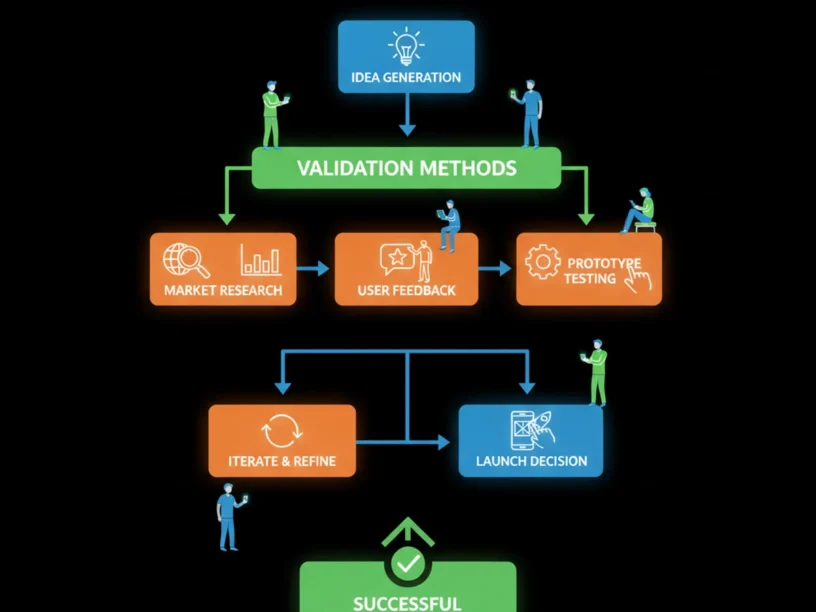
If you want to know how to validate an AI mobile app idea before spending money on development, here’s the short answer: confirm the problem is real, check that a hungry market exists, test your concept with a prototype, and use real user signals — not opinions — to decide whether to build. Done well, this process takes two to four weeks and can save you tens of thousands of dollars in wasted development costs.
- How to define and stress-test the AI problem your app genuinely solves
- How to size the market and analyse competitors before writing a single line of code
- How to run rapid user interviews and interpret what people tell you
- How to use a landing page and prototype to collect hard behavioural evidence of demand
Prerequisites: No technical background required. You need a rough idea of the problem you want to solve, access to potential users you can speak to, and a willingness to hear honest feedback.
Why Validate an AI Mobile App Idea in 2026
CB Insights found that 43% of failed products and startups cite poor product-market fit as their primary cause of failure, and McKinsey research found that unvalidated projects run 45% over budget on average. For a first-time founder, that combination — wrong idea plus blown budget — is the fastest way to end a startup before it begins.
The AI angle adds an extra layer of risk. Building an AI-powered feature costs more than a standard feature, takes longer to get right, and can mislead you into thinking the technology itself is the product. Start by clearly defining the problem your app aims to solve. AI should not be used just for the sake of innovation — it should address a real pain point. Founders who skip straight to building an AI feature often discover, too late, that users wanted a simpler solution all along.
The Process at a Glance
| Step | Action | Time | Outcome |
|---|---|---|---|
| 1 | Define the problem your AI app solves | 1–2 days | A clear, testable problem statement |
| 2 | Research the market and map competitors | 2–3 days | Market size, gaps, and competitive landscape |
| 3 | Talk to 10–15 real potential users | 3–5 days | Honest pain-point evidence from real people |
| 4 | Test demand with a landing page or prototype | 1–2 weeks | Behavioural proof of willingness to engage |
| 5 | Score your results and make a go/no-go call | 1–2 days | Data-backed decision to build, pivot, or stop |
Total time: approximately 2–4 weeks. You can compress this to 10 days if you run steps 2 and 3 in parallel.
Step 1: Define the Problem Your AI App Solves
What You’re Doing
Before anything else, you need a precise problem statement — not a feature list. This single step determines whether every effort that follows is aimed at a real target or a moving one.
How to Do It
- Write out the problem in one sentence. Name the person affected, the specific frustration, and the current workaround they use. Example: “Busy physiotherapists in Australian private practice spend 40 minutes per patient writing SOAP notes manually, because no tool understands clinical shorthand.”
- Challenge the AI assumption. Ask yourself: does this problem require AI, or would a simple form solve it? Use AI to expand on concepts you have already spotted through real research, then validate demand with real user signals before building.
- Define your target user tightly. “Everyone” is not a target. “First-time managers at tech companies with 50–200 employees who struggle to give effective feedback” is testable.
- Write your assumptions down. List the three riskiest things that would need to be true for your idea to succeed. These become your validation targets in the steps that follow.
Best Practices
- Keep the problem statement under 30 words. If you cannot explain it briefly, you don’t understand it well enough yet.
- Avoid describing the solution in the problem statement — you want to remain open to what users actually need.
Common Mistakes
- Describing the app instead of the problem. “An AI app that helps people organise their finances” is a solution. “Australians in their 30s have no clear picture of where their money goes each month” is a problem worth validating.
What Done Looks Like
You have a single, jargon-free problem statement, a clearly named target user, and a written list of your three biggest assumptions — ready to test in the next steps. For a more detailed walkthrough, see Validate Your AI App Idea Before Building.
Step 2: Research the Market and Map Your Competitors
What You’re Doing
Market research tells you whether a problem is large enough to justify an app and whether a gap actually exists in the current solution landscape.
How to Do It
- Search app stores directly. Open the Apple App Store and Google Play and search the keywords your target user would type. Read the one-star and three-star reviews of the top apps — they’re a free window into unmet needs. The Apple App Store currently holds over 2.4 million apps, while Google Play hosts nearly two million options after a sweeping clean-up in 2024.
- Use Google Trends and keyword tools. Google Trends shows how demand shifts over time. Also use Google Keyword Planner to check monthly search volumes for the core problem your app addresses.
- Map 3–5 direct competitors. For each, note: What AI features do they use? What do users complain about? What do they charge? A simple comparison table is enough.
- Estimate market size. Find one credible industry report that puts a dollar figure on the problem you’re solving. In 2026, the mobile app market is worth $330 billion with over 320 billion downloads expected. Narrow that figure down to your target segment.
Example: Competitor Mapping Table
| Competitor | Core AI feature | Top user complaint | Price | Your potential gap |
|---|---|---|---|---|
| App A | Auto-categorises expenses | “Misses cash transactions” | $14.99/mo | Cash + card unified view |
| App B | Spending predictions | “Too complex for beginners” | Free + premium | Simpler onboarding for first-timers |
| App C | Bill negotiation AI | “Australia not supported” | $9.99/mo | AU-specific bill providers |
Best Practices
- Use Similarweb or AppTweak for deeper app store intelligence.
- Search Reddit, Facebook Groups, and LinkedIn communities where your target users gather for real conversations about their frustrations.
What Done Looks Like
You have a competitor map, a rough market size figure, and at least one clearly identified gap that existing apps fail to fill — and your AI idea sits inside that gap. For a more detailed walkthrough, see Is My App Idea Already Taken? How to Check (2026). For related guidance, see App Store Optimisation Australia Aso Best Practices For 2026.
Step 3: Talk to 10–15 Real Potential Users
What You’re Doing
User interviews are the single most reliable way to validate an AI mobile app idea before spending money on development. They replace assumption with evidence — in your target user’s own words.
How to Do It
- Find participants. Post in relevant LinkedIn groups, Facebook communities, Reddit threads, or reach out directly to your network. Aim for 10–15 people who genuinely experience the problem you identified in Step 1.
- Book 20-minute calls. Video calls via Zoom work perfectly. Offer a small thank-you — a coffee voucher goes a long way in Australia.
- Ask about the problem, not your solution. Let the user do the talking. Ask open-ended questions about their current challenges and how they solve them. Avoid pitching your app or asking “Would you use my app if it did X?”
- Listen for patterns. Qualitative data saturation typically occurs between 12 and 20 conversations. Reaching out to ten to fifteen people and asking for twenty minutes of their time is enough to identify patterns worth taking seriously.
- Record and review. Use Otter.ai to auto-transcribe calls. After all interviews, highlight recurring phrases and frustrations — these become your product’s core value proposition.
Best Practices
- Never ask “Would you pay for this?” in an interview — people say yes to be polite. Instead, ask “How do you currently solve this?” and “What have you already tried?”
- If multiple people describe the exact same frustration unprompted, you’ve found a real problem. That’s your signal to move forward.
Common Mistakes
- Pitching instead of listening. Polite interest is not market demand. If everyone says “great idea” but nobody can tell you how the problem affects them daily, you haven’t validated anything.
What Done Looks Like
You have 10–15 interview transcripts, a short list of recurring pain points, and at least five quotes from real users describing the problem in their own words.
Step 4: Test Demand with a Landing Page or Prototype
What You’re Doing
Interviews tell you people have a problem. A landing page or prototype tells you whether they’ll actually act on it. Actions like entering a card or placing a pre-order are far stronger evidence than someone saying they would pay.
How to Do It
- Build a one-page landing page. Tools like Carrd, Webflow, or Wix let you publish something credible in a few hours. A landing page spells out your app’s value proposition — what it does and who it’s for — and asks visitors to do one thing, like join a waitlist.
- Set a clear success benchmark. An email signup rate of 5% or higher on cold traffic is a strong signal. Below 2% suggests either the positioning is wrong, the audience is wrong, or the problem is not urgent enough to act on.
- Drive targeted traffic. Share in the communities where you found interview participants, run a small paid ad ($50–$100 AUD on Meta or Google), or post organically on LinkedIn. The goal is 200–500 visitors so your signup rate is statistically meaningful.
- Add a clickable prototype (optional but powerful). If a landing page alone isn’t enough to communicate your AI concept, build a no-code prototype using Figma or tools like Marvel. A working prototype lets real users interact with your idea — and their behaviour tells you far more than a survey.
- Consider a concierge approach for AI features. Manually deliver your app’s value proposition to early users. For a meal planning app, you might manually create custom meal plans for 10 users and observe whether they follow through and pay. This validates whether the core value proposition resonates before you invest in building the model.
Example: Landing Page Signal Benchmarks
| Signal | Weak | Encouraging | Strong |
|---|---|---|---|
| Waitlist signup rate (cold traffic) | Under 2% | 2–5% | 5%+ |
| Pre-order or paid early access | 0 purchases | 1–5 purchases | 10+ purchases |
| Replies to outreach emails | Under 5% | 10–20% | 25%+ |
| Prototype task completion rate | Under 40% | 40–70% | 70%+ |
Best Practices
- Keep the landing page focused on one call-to-action only. Use an outcome-driven headline, a single email field, social proof beside the form, and zero navigation.
- Use anonymised quotes from your Step 3 interviews as social proof on the page — they convert better than feature lists.
What Done Looks Like
You have a live landing page, traffic data, a signup or pre-order count, and — if you built a prototype — task completion metrics.
Step 5: Score Your Results and Make a Go/No-Go Decision
What You’re Doing
You now have real data. This step is about reading it honestly and deciding whether to build, pivot, or stop.
How to Do It
- Build a simple validation scorecard. Rate each area from 1–10: problem clarity, market size, interview evidence, landing page conversion, and competitive differentiation. If most scores are below 7, your idea needs significant refinement.
- Look for convergence, not perfection. One person in love with your idea means nothing; ten independent people stating the same need mean everything.
- Watch for the classic trap. Everybody says it’s a great idea, but nobody signs up. That’s not validation. Polite interest is not market demand.
- Make one of three calls:
- Build — strong signals across all areas. Move to prototyping and development with confidence.
- Pivot — the problem is real but your solution or target audience needs adjustment. Repeat Steps 1–4 with the new angle.
- Stop — the data consistently shows weak demand. This is a success, not a failure — you just saved yourself months of wasted effort and money.
What Done Looks Like
You have a scored validation summary, a written decision (build, pivot, or stop), and — if you’re building — a clear brief that captures the problem, the target user, the core AI functionality, and the evidence of demand.
What to Do After Completing Validation
Phase 1 — Formalise Your Concept (Week 1–2 Post-Validation)
Turn your validation brief into a structured product document. Define your minimum viable product (MVP): the smallest version of your app that delivers the core AI value your users confirmed they want. Resist the urge to add features — every addition multiplies cost and time to market.
Phase 2 — Find the Right Development Partner (Week 2–4)
For non-technical founders especially, choosing the right partner is as important as any product decision. A partner who starts with strategy and validation — not just code — will save you significant rework down the track. Appomate, a Melbourne-based full-service app development company, takes exactly this approach. They believe in empowering founders, especially those without a technical background, to innovate and transform their concepts into market-ready apps quickly and safely. Their philosophy: get further faster — helping founders turn app ideas into successful, scalable businesses, building products that are AI-native — not just AI wrappers — and using the latest AI-driven development tools to deliver faster and smarter.
Phase 3 — Prototype, Test, and Iterate (Month 1–3)
With a validated idea and a trusted partner, move into rapid prototyping. Put a working version in front of real users from your waitlist as early as possible. Early user feedback at the prototype stage is the cheapest feedback you’ll ever get.
Ready to build your app?
Book a free Visioning Call with our team today and walk away with a clear roadmap, expert feedback, and a plan to bring your idea to life. No technical knowledge required.
Resources You’ll Need
| Resource | Role in Validation | Required / Recommended / Optional | Cost |
|---|---|---|---|
| Appomate | Full-service AU app development partner; strategy, design, build, and launch | Recommended (when ready to build) | Project-based; contact for quote |
| Figma | Clickable prototype and mockup builder | Recommended | Free starter plan; paid from ~$15/mo |
| Google Trends | Search demand and trend validation | Required | Free |
| Carrd | Fast, simple waitlist landing page builder | Recommended | Free; Pro from $19/year |
| Otter.ai | Auto-transcribes user interview recordings | Recommended | Free plan available |
| Similarweb | Competitor app intelligence and traffic analysis | Optional | Free tier; paid plans from ~$125/mo |
See also, see Test Your Idea in 120s — AI Startup Validator 2026.
Troubleshooting Common Issues
Nobody Is Signing Up to My Landing Page
Likely cause: Your headline is describing the app’s features rather than the user’s problem.
Fix: Rewrite the headline to name the specific frustration your user feels, not the technology you’re building. Test two different headlines with small ad spends ($20–$30 AUD each). If signups remain below 2% after changes, revisit whether the problem is urgent enough to drive action.
Everyone Loves the Idea in Interviews But Won’t Commit to Anything
Likely cause: The problem exists but isn’t painful enough to drive behaviour change.
Fix: Ask interviewees: “What would it cost you — in time, money, or stress — if this problem continued for another year?” If they struggle to answer, the pain level is too low. Consider narrowing to a sub-segment who feels the problem more acutely.
My AI Feature Sounds Impressive But Users Don’t Understand What It Does
Likely cause: You’re explaining the mechanism (how AI works) instead of the outcome (what the user gets).
Fix: Replace all technical language with outcome language. Instead of “uses natural language processing to analyse your data,” try “tells you exactly where your money went this month, in plain English.” Test the new messaging on your landing page.
I Can’t Find Enough People to Interview
Likely cause: Your target user is defined too broadly or too narrowly.
Fix: Search LinkedIn, Reddit, and Facebook Groups using your target user’s job title or shared interest. Post transparently — explain you’re a founder researching a problem, not selling anything. Aim for at least eight interviews before drawing conclusions. For more troubleshooting advice, see Validate AI App Idea: Step-by-Step Guide for Startups.
Conclusion
Key Takeaways
- Validation before development is survival, not caution. The five steps in this guide — define the problem, research the market, interview users, test demand, and score your results — can be completed in two to four weeks and cost very little.
- Behavioural evidence beats verbal enthusiasm every time. Waitlist signups, pre-orders, and prototype engagement tell you far more than “that sounds great.” Build your confidence on what people do, not what they say.
- Validation is the beginning of the journey, not a box to tick. Once your data confirms you have a real problem and a receptive market, partner with people who understand both the product and the business. Start with Appomate to see how Australia’s most experienced founder-focused team approaches the path from validated idea to launched product.
FAQ
How do you validate an AI mobile app idea?
Follow five steps before committing any budget to development. First, write a precise problem statement that names who has the problem, how often it occurs, and what they currently do about it. Second, research the market: search app stores for competitors, read negative reviews to find gaps, and use tools like Google Trends to confirm search demand. Third, interview 10–15 real potential users and listen for repeated frustrations. Fourth, publish a landing page or clickable prototype, drive 200–500 targeted visitors to it, and measure how many take a concrete action (sign up, pre-order, or complete a task). Fifth, score your results honestly and decide whether to build, pivot, or stop. Strong validation — multiple users describing the same problem unprompted, a landing page converting above 5%, and at least one person willing to pay — tells you that your AI mobile app idea is worth building.
How long does AI app validation take?
A thorough validation process takes two to four weeks for most first-time founders working part-time on it. You can compress this to 10 days if you run market research and user interviews in parallel.
Do I need a technical background to validate an app idea?
No. Validation is entirely a market and user research process, not a technical one. You’re testing whether a problem is real and whether people want a solution — not building anything. Tools like Figma (for prototypes) and Carrd (for landing pages) require no coding knowledge.
What is the difference between market research and user interviews for app validation?
Market research tells you what exists: how big the market is, who the competitors are, and what users are searching for. User interviews tell you what is felt: the specific frustrations, workarounds, and unmet needs of real people. Both are essential. Use them together for the clearest picture.
How do I know if my app idea has enough demand to build?
Look for convergence across multiple validation methods. Strong signals include: at least eight of your ten interviewees describing the same core frustration unprompted; a landing page converting above 5% on cold traffic; at least one potential user willing to pay or pre-order before the app exists; and a competitive gap that is not already being served well.
What makes validating an AI app idea different from validating a regular app?
AI apps carry two extra risks that standard apps don’t. First, the AI feature itself may be technically difficult or expensive to build at production quality — making it critical to confirm users actually want the outcome it produces. Second, AI can obscure a weak value proposition: a flashy demo impresses people in ways that don’t translate to retention or payment. To validate an AI app properly, simulate the AI output manually and test whether users value the result before you invest in building the underlying model.
When should I involve a development partner in the validation process?
Bring in a development partner after Step 3 (user interviews) and before or during Step 4 (landing page and prototype testing). An experienced partner can help you design a prototype that accurately represents what is technically feasible. Partners like Appomate, who start with strategy and idea validation, are particularly valuable at this stage.
What should I do if my validation results are mixed?
Mixed results — where some signals are strong and others are weak — are actually the most common validation outcome. Identify which single assumption is failing. If the problem is validated but the landing page doesn’t convert, the issue is messaging or positioning — not the idea itself. Use the weakest signal as your next experiment: adjust that one element, run a new test, and measure again before committing to a full build.
Methodology note: This guide is based on publicly available research, app market data, and best-practice validation frameworks current as of August 2026. Statistics cited are sourced from CB Insights, McKinsey, Statista, and other third-party research organisations as linked inline. Appomate brand information is sourced directly from Appomate’s official company descriptions. This article is intended as general guidance for founders and entrepreneurs and does not constitute financial, legal, or investment advice. Individual results from validation activities will vary based on market, audience, and execution quality.