how long does it take to build an AI mobile app in Australia from idea to launch? | Updated August 2026 | Appomate Editorial Team | 16–30 weeks total (idea to live app) | Beginner
What You’ll Learn
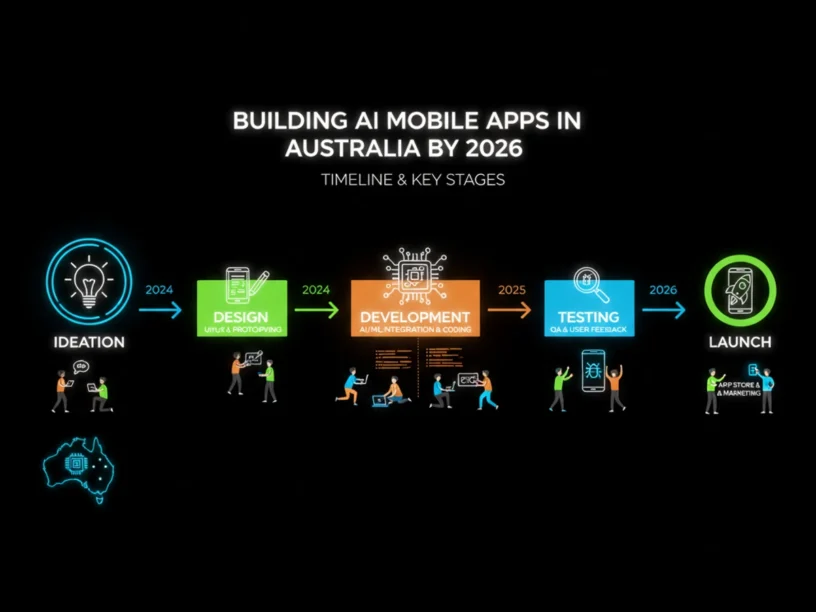
For a well-scoped AI mobile app MVP, expect 16 to 30 weeks from initial idea to a live product on the App Store and Google Play. This breaks down into four stages: Discovery (2–4 weeks), Design (4–6 weeks), AI MVP Development (8–14 weeks), and Launch (2–4 weeks). With focused scope and an experienced partner, Appomate has helped founders launch in as little as 6 weeks for tightly-scoped MVPs.
- Understand what happens at each stage of the AI app development process in Australia
- Know which factors compress or extend your timeline
- Avoid common mistakes that blow out timelines and budgets
- Learn how to choose the right development approach for faster, safer market entry
Prerequisites: No technical knowledge required. This guide is for founders, entrepreneurs, and business owners evaluating AI app development in Australia.
Why Timeline Matters for Your AI App Launch in 2026
Timeline is critical for success. The global mobile application market is expected to grow from USD 333.93 billion in 2025 to USD 391.3 billion in 2026, and Australia is one of the fastest-moving markets. With over 27 million active smartphone users expected in Australia by 2026 and smartphone penetration exceeding 90 percent, the opportunity is large but the window to capture it isn’t unlimited.
Speed to market is now a strategic advantage. A late launch can mean losing your target market to competitors. In 2026, AI-powered mobile apps use machine learning, natural language processing, computer vision, and generative AI to deliver personalized experiences — and Australian founders who move decisively build durable competitive advantages. AI-assisted development tools like GitHub Copilot and Cursor accelerate coding by 40–60%, compressing what once took 9–12 months into a manageable timeline. For supporting data, see How to Develop an App in Australia 2026: A Complete Guide. For related guidance, see AI Integration Mobile Apps Australia Machine Learning Development.
The Process at a Glance
| Step | Action | Time | Outcome |
|---|---|---|---|
| 1 | Validate your idea and define scope | 2–4 weeks | Validated concept, clear feature list |
| 2 | Design the user experience and prototype | 4–6 weeks | Clickable prototype, signed-off designs |
| 3 | Build your AI MVP with agile sprints | 8–14 weeks | Tested, working app on both platforms |
| 4 | Submit, launch, and go live | 2–4 weeks | App live on App Store and Google Play |
| 5 | Iterate post-launch based on real data | Ongoing | Growing, improving product in market |
Total estimated time from idea to live app: 16–30 weeks, depending on app complexity, AI feature depth, your decision-making speed, and your development partner’s experience.
Step 1: Validate Your Idea and Define Scope (Discovery)
What You’re Doing
Discovery turns your rough idea into a validated, scoped product plan. Founders who skip discovery often end up reworking large parts of the product — far more expensive than spending 2–4 weeks getting it right upfront.
How to Do It
- Define the core problem your app solves in one or two sentences for a specific user.
- Research your target users: talk to at least 5–10 potential users before writing specifications.
- Map the competitive landscape and your differentiation.
- Define your core feature set — the absolute minimum needed to deliver value. Commit to your AI strategy: are you integrating a pre-trained model via API, fine-tuning an existing model, or building custom AI from scratch?
- Document your scope in a product brief so every stakeholder is aligned before design begins.
Best Practices
- Keep scope ruthlessly tight. Founders consistently underestimate MVP timelines by two to three times — not because development is slow, but because they overscope features.
- Decide on your AI integration approach early. Pre-trained models from OpenAI or Google enable faster deployment — 2–4 week implementation versus 3–6 months for custom model development.
Common Mistakes
- Building before validating. Launching with assumptions instead of user insights is the most common reason Australian app projects stall after launch.
- Over-engineering the AI layer. Spend two weeks on problem definition before contacting any agency.
AI Integration Timeline
| AI Integration Type | Example Use Case | Estimated Additional Time |
|---|---|---|
| Pre-trained API (e.g. OpenAI) | Chatbot, content generation, recommendations | 2–4 weeks |
| Fine-tuned model | Industry-specific classification or scoring | 4–8 weeks |
| Custom AI model | Proprietary predictions on your dataset | 3–6 months |
What Done Looks Like
You have a written product brief, a prioritised feature list, a defined AI integration approach, and sign-off from your development partner — ready to move into design without ambiguity. For a more detailed walkthrough, see Startup Mobile App Development Timeline Australia 2026. For related guidance, see How To Validate An AI Mobile App Idea Before Spending Money On Development.
Ready to build your app?
Book a free Visioning Call with our team today and walk away with a clear roadmap, expert feedback, and a plan to bring your idea to life. No technical knowledge required.
Step 2: Design the User Experience and Prototype
What You’re Doing
Design translates your validated idea into a visual and interactive product before any code is written. Getting design right before development begins is one of the highest-leverage investments in your timeline and budget.
How to Do It
- Start with wireframes: low-fidelity sketches of every screen and user flow.
- Add visual design: apply your brand identity to create high-fidelity mockups.
- Build a clickable prototype in a tool like Figma so you can test the experience before development begins.
- Run at least one round of user testing on the prototype and incorporate feedback.
- Get formal sign-off from stakeholders before handing designs to developers — changes at this stage cost hours; changes in development cost weeks.
Best Practices
- In Australia, roughly 55–60% of users are on iOS, making a polished iPhone experience critical — though cross-platform reach remains essential.
- Plan at least one to two revision rounds into your design timeline.
Common Mistakes
- Skipping user testing on the prototype. The prototype is your cheapest opportunity to discover usability issues before expensive development rework.
What Done Looks Like
You have a fully designed, clickable prototype tested with real users, signed off by stakeholders, and ready for your development team with no open design questions.
Step 3: Build Your AI MVP with Agile Sprints (Development)
What You’re Doing
Development is the longest stage and most directly determines your time to market. It builds the actual working product: front-end interfaces, back-end systems, database architecture, API integrations, and your AI layer — all tested and quality-assured before launch.
How to Do It
- Work in two-week agile sprints with defined deliverables at the end of each.
- Integrate your AI features in early sprints so you have time to test model performance before launch.
- Choose a cross-platform framework like Flutter or React Native where appropriate — cross-platform development cuts the timeline by 30–40% compared to separate native apps.
- Build QA testing into every sprint. Block out dedicated QA time early, not right before launch.
- Conduct a beta test with at least 12 real users before public launch (which also satisfies Google Play’s closed-test requirement for new developer accounts).
Best Practices
- AI-assisted development tools now generate boilerplate code — authentication flows, database migrations, API scaffolding — in minutes instead of hours, so experienced partners using these tools compress your build phase significantly.
- Resist adding features during development. Scope creep is one of the most common internal drivers of project delays.
AI MVP Timeline by Complexity
| App Type | AI Feature Example | Build Phase Duration | Total Idea-to-Launch |
|---|---|---|---|
| Simple MVP (3–5 features) | AI chatbot via OpenAI API | 6–8 weeks | 14–20 weeks |
| Medium MVP (5–8 features) | Personalised recommendations engine | 8–12 weeks | 18–26 weeks |
| Complex MVP (custom AI) | Proprietary predictive model | 12–18+ weeks | 24–30+ weeks |
What Done Looks Like
You have a fully tested, working app on both iOS and Android that has passed internal QA, completed a closed beta with real users, and is ready for store submission with zero critical bugs outstanding.
Step 4: Submit, Launch, and Go Live
What You’re Doing
Launch covers App Store and Google Play submission, review, approval, and the first public release. Apple’s App Store reviews over 90% of submissions within 24 hours; Google Play new app submissions can take 3–7 days.
How to Do It
- Prepare your App Store and Google Play listings: app name, description, keywords, screenshots, and a privacy policy URL.
- Submit to both stores simultaneously.
- For Google Play: new developer accounts must run a closed test with at least 12 testers for 14 continuous days before applying for production access — factor this into your launch timeline.
- Respond promptly to any reviewer questions.
- Plan a soft launch before a full public launch to catch any post-approval issues.
Best Practices
- Submit early in the week — Monday or Tuesday — to avoid weekend review delays.
- Build a buffer of at least one to two weeks into your launch plan for review delays and re-submissions. Pad your schedule by 10–15% for bugs, API surprises, and review delays.
Common Mistakes
- Submitting an incomplete store listing. Apple’s 2024 transparency report showed a roughly 24.7% rejection rate, with most rejections falling into predictable, preventable categories. Incomplete metadata and minimum-functionality issues are the most common causes.
What Done Looks Like
Your app is live on the Apple App Store and Google Play, accessible to your target audience in Australia, with analytics tracking active so you can collect real-world usage data immediately.
Step 5: Iterate Post-Launch Based on Real Data
What You’re Doing
Launching your app is the starting gun, not the finish line. The post-launch phase is where you transform a working MVP into a product users love and keep returning to.
How to Do It
- Monitor your analytics from day one: track activation rate, day-7 retention, and core AI feature engagement.
- Collect qualitative feedback via in-app prompts, user interviews, and app store reviews.
- Prioritise your first post-launch sprint based on data, not gut feel.
- Plan your first major feature update within 4–6 weeks of launch to signal that your product is actively maintained.
Post-Launch Phases
Phase 1: Stabilise (Weeks 1–4 Post-Launch) Fix critical bugs immediately, respond to App Store reviews publicly, and monitor performance metrics daily. A strong launch week sets the algorithmic foundation for App Store ranking for months to come.
Phase 2: Grow (Months 2–6 Post-Launch) With a stable base, shift focus to user acquisition and retention. Test your AI features with larger cohorts, refine personalization based on behavioural data, and begin marketing — app store optimization, content marketing, and targeted digital campaigns.
Phase 3: Scale (Month 6 and Beyond) Evaluate product-market fit honestly. If retention is strong and unit economics are improving, invest in scaling — deeper AI capabilities, new market segments, enterprise features, or international expansion. If data reveals a pivot is needed, your lean MVP structure makes that far less costly.
Resources You’ll Need
| Resource | Role | Status | Cost |
|---|---|---|---|
| Appomate | Full-service AI app development partner | Recommended | Custom pricing |
| Figma | UI/UX design and interactive prototyping | Recommended | Free tier; paid from ~$15/month |
| Flutter | Cross-platform mobile development framework | Recommended | Free (open source) |
| OpenAI API | Pre-trained AI models | Optional | Pay-per-use from ~$0.002 per 1K tokens |
| Mixpanel | Product analytics for user behaviour tracking | Recommended | Free tier; paid from $28/month |
See also, see How to Actually Build Mobile Apps with AI in 2026 | A …. For related guidance, see Best Paid User Acquisition Strategies For Mobile Apps In 2026.
Troubleshooting Common Issues
Your timeline keeps blowing out past initial estimates
Likely cause: Scope creep — features are being added during development without adjusting the timeline. Adding too many features stretches your timeline and adds complexity, ultimately delaying your project and making it more expensive.
Fix: Implement a strict change-request process. Any new feature request during development must go through formal scope assessment. Protect your MVP scope like it’s a contract.
Your app is rejected by the App Store on first submission
Likely cause: Incomplete metadata, insufficient functionality, or privacy policy issues. Most App Store rejections trace back to crashes, incomplete metadata, or minimum functionality guideline violations.
Fix: Treat store submission preparation as a dedicated two-week workstream. Use Apple’s App Store Review Guidelines checklist before submitting, ensure your privacy policy is live and linked, and test on real devices — not just simulators.
Your AI feature is not performing as expected after launch
Likely cause: The AI model was tested with insufficient or unrepresentative data. No AI system is better than the data it’s built on — and real-world user behaviour often differs significantly from test assumptions.
Fix: Build a data feedback loop into your app from day one. Plan your first AI model refinement sprint for 4–6 weeks post-launch once you have real usage data.
You cannot get clear timelines or commitments from your development partner
Likely cause: You’re working with a team on time-and-materials basis with loosely scoped work. Six-month builds typically involve loosely-scoped statements of work and time-and-materials contracts.
Fix: Before signing with any development partner, insist on a fixed-scope discovery phase that produces a written specification, feature list, and project timeline. If a partner can’t give you a clear timeline after discovery, they’re not the right partner. For more troubleshooting advice, see How to Actually Build Mobile Apps with AI in 2026 | A ….
Conclusion
Knowing how long it takes to build an AI mobile app in Australia — typically 16 to 30 weeks across four stages — lets you plan funding, marketing, and hiring around a realistic schedule. The biggest determinant of your timeline is your scope decisions in the Discovery stage. A tightly scoped MVP with one core AI feature reaches market faster than a feature-rich product attempting to solve every problem at once.
Start with a structured Discovery session with an experienced partner. Appomate empowers founders to transform concepts into market-ready apps quickly and safely, leveraging years of proven expertise and a founder-focused approach. With over 250 apps delivered and a model combining Australia-based strategy and design with a world-class global development team, Appomate offers premium quality at startup-friendly pricing — one partner for the whole journey from validation to launch, growth, and exit.
FAQ
How Long Does It Take to Build an AI Mobile App in Australia 2026?
Building an AI mobile app in Australia from idea to launch typically takes 16 to 30 weeks for a well-scoped MVP. The timeline breaks into: Discovery (2–4 weeks), Design (4–6 weeks), AI MVP Development (8–14 weeks), and Launch (2–4 weeks). With AI-assisted development tools and an experienced partner, founders with tightly-scoped ideas have launched in as little as 6 weeks. Primary factors determining your timeline are AI integration complexity, feature scope, and decision-making speed.
What are the main stages of the AI app development process in Australia?
The four core stages are: (1) Discovery — validating your idea, defining your AI strategy, and scoping features (2–4 weeks); (2) Design — wireframes, high-fidelity UI/UX, interactive prototyping, and user testing (4–6 weeks); (3) AI MVP Development — agile sprint-based build, AI model integration, QA testing, and beta release (8–14 weeks); and (4) Launch — App Store and Google Play submission, review, and release (2–4 weeks).
What factors make an AI app take longer to build in Australia?
Main factors extending timelines: complexity of AI integration (pre-trained API adds 2–4 weeks; custom model adds months); number and complexity of features; whether building for iOS only or cross-platform (Flutter and React Native cut build time by 30–40%); development partner experience; and your decision-making speed. Australian-specific factors include App Store review times and Google Play’s 14-day closed-testing requirement for new developer accounts.
Can a non-technical founder build an AI app in Australia without a technical co-founder?
Yes — AI-assisted development tools and experienced full-service partners have made technical co-founders optional for many founders. Choose a development partner who acts as a true product partner, guiding you through validation, design decisions, and technical trade-offs. Appomate specialises in empowering founders without technical backgrounds, handling everything from strategy and design through development, launch, marketing, and ongoing support.
How much does it cost to build an AI mobile app in Australia in 2026?
Costs vary by complexity: simple MVPs typically start from AUD 30,000–60,000; medium-complexity apps with AI features range from AUD 60,000–150,000; complex platforms with custom AI models can exceed AUD 250,000. Hybrid delivery models combining Australia-based strategy and product management with skilled global development teams offer premium quality at startup-friendly pricing.
What is the fastest way to launch an AI mobile app in Australia?
The fastest path involves: (1) scope ruthlessly — build one core AI feature for one user problem and defer everything else to post-launch; (2) use a pre-trained AI API rather than building a custom model; (3) choose a cross-platform framework like Flutter; and (4) work with an experienced partner using AI-assisted development tools. Well-scoped MVPs can launch in 6–16 weeks with this combination.
Should I launch on iOS first or build for both iOS and Android from the start in Australia?
In Australia, approximately 55–60% of users are on iOS, historically making an iOS-first approach sensible. However, modern cross-platform frameworks like Flutter and React Native add very little extra development time while significantly expanding your audience. For most Australian founders in 2026, a cross-platform approach launching on both stores simultaneously is recommended unless you have a specific strategic reason to sequence platforms.
Methodology: Timeline estimates are based on published industry research from Appomate’s own delivery data (250+ apps delivered), Technijian, Bolder Apps, Codevelo, and The Mobile Reality, plus App Store and Google Play review data (2025–2026). Ranges reflect variability across app complexity, AI integration type, team experience, and founder decision-making speed. This guide is educational and does not constitute a fixed project proposal. For tailored estimates, consult a qualified app development partner.